Crates
A crate is a versioned package of KubeVela definitions. The package also carries the Kubernetes objects that those definitions need to work. Examples of these objects are Crossplane XRDs, Compositions, ConfigMaps, and RBAC rules.
You publish a crate to an OCI registry, the same type of registry that holds container images and Helm charts. You install the crate into a namespace with one component of type crate. KubeVela then installs the objects in a fixed order and makes the definitions available to the Applications in that namespace.
Crates are new in KubeVela v1.12. The feature is alpha and off by default. To turn it on, see Turn the feature on.
A crate is not a defkit Go definition module. A crate has a _crate.cue file, and you use it with the vela crate commands. A defkit module has a module.yaml file, and you apply it with vela def apply-module. For those modules, see Module Hooks.
Why crates
Definitions are the contract between a platform team and the application teams. An application team writes type: bucket and gives some parameters. The platform team owns the template behind that type.
Without crates, this contract is difficult to change safely:
- An addon upgrade replaces the definitions in place. A running Application does not change until its spec changes. After the upgrade, a breaking change to a parameter applies to every new Application and to every Application that you update.
- To prevent this, teams copy a definition to a new name, such as
bucket-v2. Over time, the cluster collects many copies with no clear owner and no clear version. - A definition often needs other objects to work, such as a Crossplane Composition. You must install those objects separately, and in the necessary order.
- An Application cannot tell which release of a definition it uses.
A crate solves these problems with three ideas:
- API lines. A crate has one or more API lines, for example
v1andv2. Each line is a stable contract. A breaking change goes into a new line. The old line stays installed until all Applications move to the new line. - One package for each release. The definitions and the objects that they need are in one package with one version tag. Install a tag, and you receive all the parts of that release.
- Ordered install. KubeVela installs the supporting objects first and the definitions last.
Inspiration
Crates use patterns that Kubernetes and Go users already know.
| Pattern | Where you know it from | How a crate uses it |
|---|---|---|
| More than one served version | A CRD can serve more than one version at the same time. Each client selects one. | A crate can install API lines v1 and v2 at the same time. An Application selects one in its type, for example aws-s3/v1/bucket. Line names use the Kubernetes version format, for example v1 or v1beta1. |
| Major version in the import path | A Go module puts a breaking release at a new path, for example example.com/lib/v2. | A breaking change goes into a new API line, so the type changes from aws-s3/v1/bucket to aws-s3/v2/bucket. |
| OCI artifacts | Container images and Helm charts are stored in OCI registries, with tags. | A crate release is an OCI artifact. The tag is the package version, for example 1.2.0. |
Terms
| Term | Meaning |
|---|---|
| Crate | A package with a name, for example aws-s3. The name is a DNS-1123 label. |
| Package version | The release of the package, for example 1.2.0. It is the OCI tag. It tells you which files are in the package. |
| API line | A contract in the crate. A stable line has a name of the form vN, for example v1. A preview line has a name of the form vNalphaN or vNbetaN, for example v2beta1. Applications bind to an API line, not to a package version. |
| Capability | One definition in an API line, for example bucket. |
| Auxiliary object | A Kubernetes object that the crate installs to support its definitions. Examples are an XRD, a Composition, or a ConfigMap. |
| Crate registry | A name for an OCI location that holds crates. You add it with vela crate registry add. |
| Installer Application | The Application that contains the type: crate component. You create it with YAML or with vela crate deploy. Its namespace is the install namespace. |
| Owned Application | The Application crate-<name> in vela-system. KubeVela creates it from the installer Application. It installs the objects of the crate. |
The package version and the API line are different numbers. Package 1.0.0 of aws-s3 contains lines v1 and v2. Package 1.0.1 can fix a bug in line v1. Publishing 1.0.1 does not change an install. After you upgrade the install to 1.0.1, Applications that use aws-s3/v1/bucket receive the fix, and their YAML does not change.
How a crate is deployed
The diagram shows the path of the aws-s3 crate from the source directory to the Applications that use it. The crate has two API lines, v1 and v2. Purple boxes are objects that the crate installs, green boxes are definitions, and blue boxes are Applications.
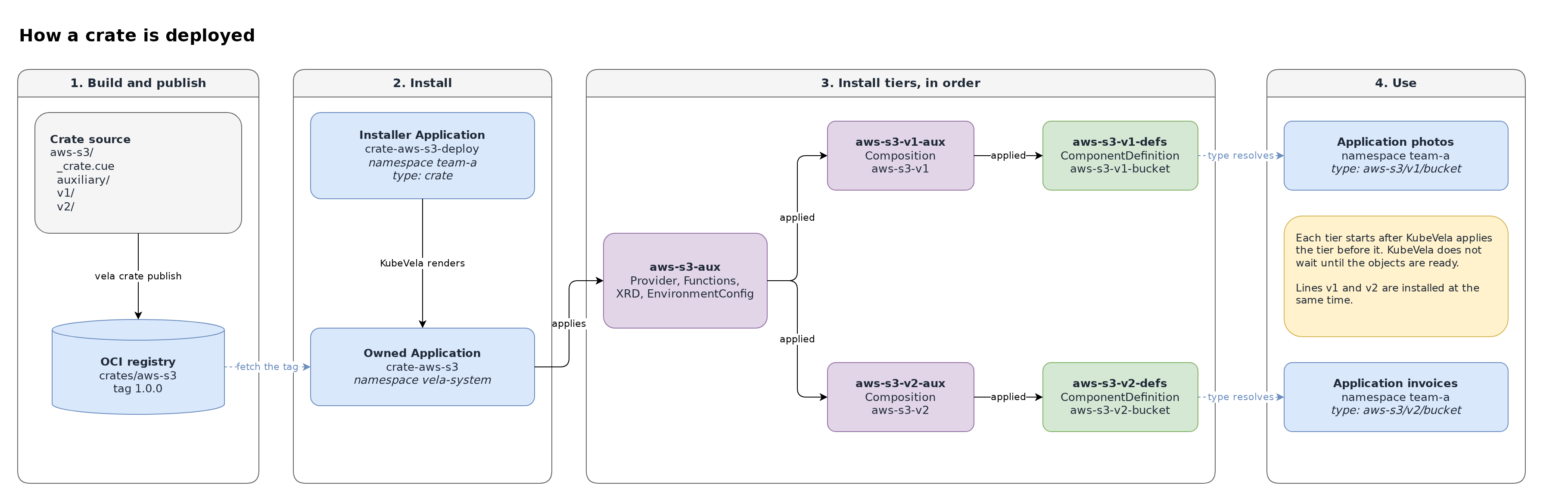
-
The crate author runs
vela crate publish. The CLI parses the directory and pushes it to the registry as one OCI artifact. By default, the tag is theversionin_crate.cue. The--versionflag pushes with a different tag. -
You create the installer Application in a namespace, for example
team-a. You can write the YAML, or runvela crate deploy. -
KubeVela fetches the package tag from the registry. It renders the owned Application
crate-aws-s3invela-system. -
The owned Application applies the objects in tiers:
<crate>-aux: the objects that all API lines share, fromauxiliary/. Foraws-s3, these are the Crossplane provider, the functions, the XRD, and the EnvironmentConfig.<crate>-<line>-aux: the objects for one API line, fromv1/auxiliary/orv2/auxiliary/. Foraws-s3, each line has its own Composition.<crate>-<line>-defs: the definitions of that line.
For a crate with placement, KubeVela splits each auxiliary tier. The runtime objects keep the tier name, and the hub objects go into a tier with the suffix
-hub, for exampleaws-s3-aux-hub. The definitions tiers do not split. See Crate Multi-Cluster Placement. -
Applications in
team-acan now usetype: aws-s3/v1/bucketandtype: aws-s3/v2/bucket.
Each tier starts after KubeVela applies the tier before it. The two lines do not wait for each other. KubeVela does not wait until the objects in a tier are ready. For example, the definitions can be available before Crossplane installs the provider.
KubeVela creates the definitions in the install namespace. A namespaced auxiliary object that does not set metadata.namespace also goes into the install namespace. A cluster-scoped object, for example an XRD, stays cluster-scoped.
The owned Application keeps the state of the installed objects. If a person deletes one of these objects, KubeVela applies it again at the next reconcile.
A cluster holds one install of each crate name. To install the crate in a different namespace, uninstall it first. See Change the namespace of an install.
What a crate can contain
A crate can carry any Kubernetes object and any type of KubeVela definition. These are some typical crates:
| Crate | Auxiliary objects | Definitions |
|---|---|---|
| Cloud resources with Crossplane | Provider, Functions, XRD, Composition, EnvironmentConfig | A component that creates a composite resource, for example a bucket or a database |
| Resource graphs with KRO | ResourceGraphDefinition | A component that creates an instance of the graph |
| Team conventions | ConfigMaps with defaults, RBAC rules | Traits that add labels or annotations, and policies |
| Delivery steps | Secrets or ConfigMaps for an external system | Workflow steps that call that system |
Example: S3 buckets with Crossplane
The next pages use this example. A platform team gives application teams an S3 bucket. Crossplane creates the bucket in AWS. The crate has two API lines, and one cluster serves both lines at the same time:
- Line
v1takes an optionalregionand some tags. - Line
v2changes the name ofregiontolocation, and it adds the required parameterowner. These are breaking changes, so they are in a new line.
aws-s3/
  _crate.cue                   crate: "aws-s3", version: "1.0.0"
  auxiliary/                   Objects that both lines share
    packages.yaml              Crossplane Provider and Functions
    xrd.yaml                   Crossplane XRD: the ObjectBucket API
    settings.yaml              EnvironmentConfig: default region and tags
  v1/
    _version.cue               apiVersion: "v1"
    auxiliary/
      composition.yaml         Composition aws-s3-v1
    definitions/
      bucket.cue               ComponentDefinition: region, tags
  v2/
    _version.cue               apiVersion: "v2"
    auxiliary/
      composition.yaml         Composition aws-s3-v2
    definitions/
      bucket.cue               ComponentDefinition: location, owner, tags
Two application teams in team-a use the two lines at the same time. Each Application selects its line in type:
apiVersion: core.oam.dev/v1beta1
kind: Application
metadata:
  name: photos
  namespace: team-a
spec:
  components:
    - name: photos
      type: aws-s3/v1/bucket
      properties:
        region: eu-west-1
        tags:
          team: photos
---
apiVersion: core.oam.dev/v1beta1
kind: Application
metadata:
  name: invoices
  namespace: team-a
spec:
  components:
    - name: invoices
      type: aws-s3/v2/bucket
      properties:
        location: eu-central-1
        owner: team-billing
        tags:
          team: invoices
Each definition selects the Composition of its line, so each Application receives its own bucket. Later, the photos team can move to v2. When no Application uses v1, the platform team retires v1 in a new package version.
The full crate, with every file and each of these steps, is in Example: S3 Buckets with Crossplane.
Quick start
These commands publish a crate and install it. To use its definitions in an Application, see Use the definitions. The next pages explain each command.
# Register the OCI location of your crates. Do this one time for each cluster.
vela crate registry add catalog oci://ghcr.io/myorg/crates

# Create a crate. Edit the files, and set version: "1.0.0" in _crate.cue.
vela crate init aws-s3
vela crate publish ./aws-s3 --registry catalog

# Install the crate into the namespace team-a. The namespace must exist.
kubectl create namespace team-a
vela crate deploy aws-s3 --registry catalog --version 1.0.0 -n team-a

# Check the install.
vela status crate-aws-s3-deploy -n team-a
Next steps
- Crate Registries: turn on the feature, install the CLI, add a registry, and set publish credentials.
- Install and Use a Crate: install with the CLI or with YAML, use the definitions, upgrade, and uninstall.
- Build and Publish a Crate: the package layout, the files, and the publish rules.
- Example: S3 Buckets with Crossplane: a full crate, from files to a bucket.
- Crate Multi-Cluster Placement: send the supporting objects to managed clusters.
- Crates in Addons: include crates in an addon.
- The
cratecomponent fields: built-in components.