Crate Multi-Cluster Placement
In a multi-cluster setup, KubeVela runs on one cluster, the hub. The hub sends workloads to managed clusters. A crate can send some of its objects to the managed clusters and keep other objects on the hub.
This page uses these words:
| Word | Meaning |
|---|---|
| Hub | The cluster where KubeVela runs. Its cluster name is local. |
| Managed cluster | A cluster that you added with vela cluster join. |
| Hub object | A crate object that installs only on the hub. |
| Runtime object | A crate object that installs on the clusters that the installer selects. |
Why placement is necessary
KubeVela renders Applications on the hub, so the definitions must be on the hub. Some supporting objects must be on the cluster where the workload runs.
The Crossplane example shows this. An Application on the hub sends an ObjectBucket to a managed cluster. Crossplane on that cluster needs the provider, the functions, the XRD, the Compositions, and the EnvironmentConfig on the same cluster. If those objects are only on the hub, the bucket is never created.
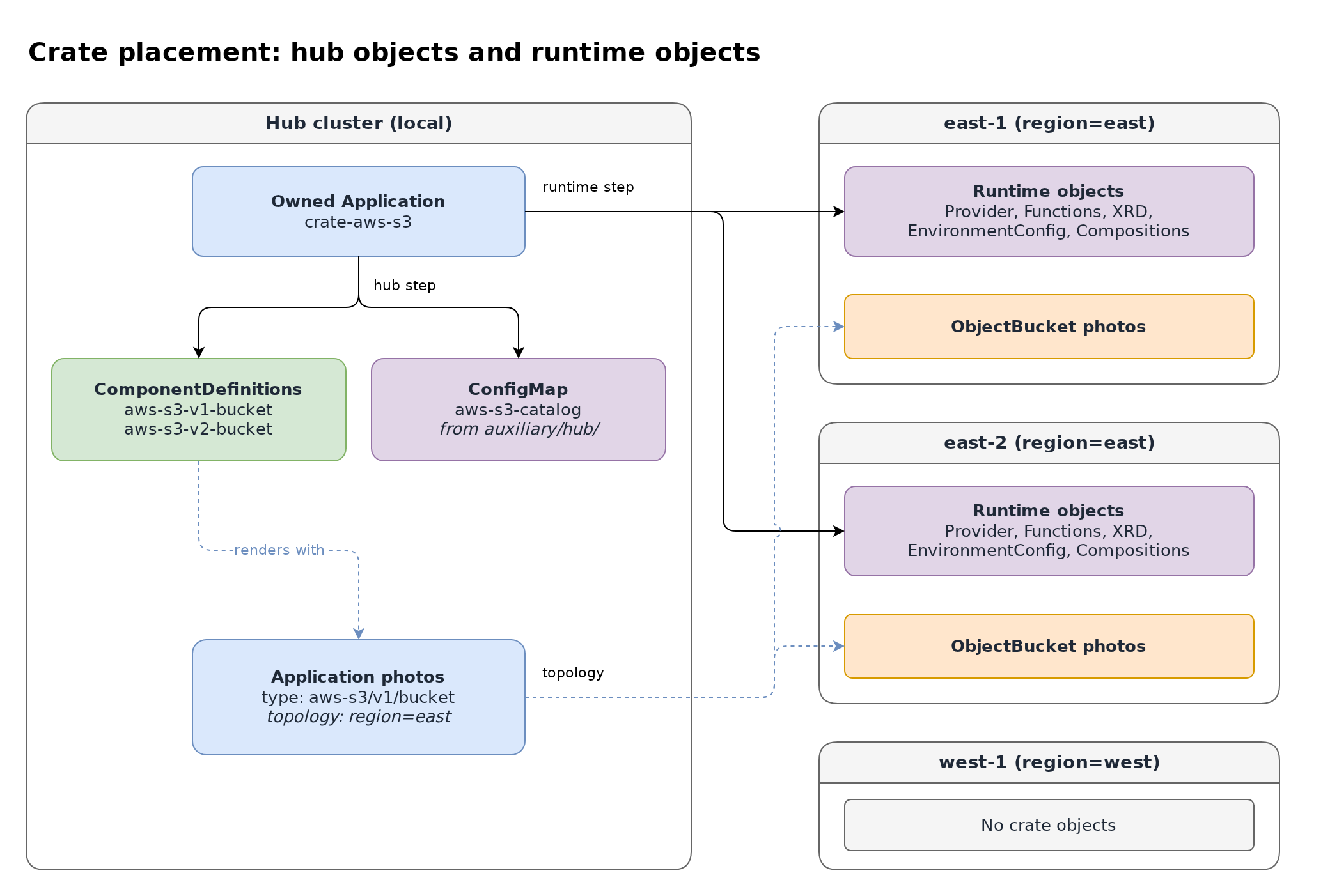
In this diagram, the installer selects the clusters with the label region=east. The hub step installs the definitions of lines v1 and v2 and the catalog ConfigMap on the hub. The runtime step installs the Crossplane objects on east-1 and east-2. The cluster west-1 does not match, so it receives no crate objects. The Application photos uses a topology policy to send its ObjectBucket to the same clusters.
The purple boxes are crate objects, and the green box holds the definitions. The blue boxes are Applications. The orange boxes are the objects that photos creates.
The crate author and the installer each make one decision:
| Who | Decision | Where |
|---|---|---|
| Crate author | Which objects are hub objects, and which are runtime objects | Files and fields in the crate |
| Installer | Which clusters receive the runtime objects | placement on the type: crate component, or vela crate deploy flags |
Definitions always install on the hub. Hub objects always install on the hub.
Before you start
-
Use a KubeVela version that supports crate placement, with
EnableCrateComponenton. See Crate Registries. -
Join the managed clusters and add labels. See Lifecycle of Managed Cluster.
vela cluster join east-1.kubeconfig --name east-1vela cluster join east-2.kubeconfig --name east-2vela cluster labels add east-1 region=eastvela cluster labels add east-2 region=eastvela cluster listThe hub must be able to reach the API server address in each joined kubeconfig.
-
Install Crossplane on each managed cluster before you install the crate. The crate sends the provider and the functions. After the provider is Healthy, create the credentials Secret and the
ClusterProviderConfigon that cluster. See Add the AWS credentials. -
Create the install namespace on the hub, because
vela crate deploy -n platformfails when the namespace does not exist. Then create the namespaces on each managed cluster. KubeVela does not create them:- The install namespace, if the runtime objects include namespaced objects.
- Each namespace that a runtime object sets in
metadata.namespace. - The namespace of each Application that sends workloads to the cluster.
vela cluster joincreates onlyvela-system. See The namespace of runtime objects.
The namespace of runtime objects
Read these rules before you select an install namespace for a crate with runtime objects.
- A namespaced runtime object that does not set
metadata.namespacegoes into the install namespace. A cluster-scoped object stays cluster-scoped. The install namespace is the namespace of the installer Application. KubeVela also creates the definitions of the crate in this namespace. The owned Applicationcrate-<name>stays invela-system. - The definitions stay on the hub, in the install namespace.
- KubeVela does not create the install namespace on a managed cluster.
vela-systemexists on each managed cluster, becausevela cluster joincreates it. Any other install namespace, for exampleplatform, must exist on each managed cluster before you install. - An object that sets
metadata.namespacekeeps that namespace.
If the install namespace does not exist on a selected cluster, the runtime step fails. The hub step succeeds, so the definitions are available on the hub:
Step deploy-crate-runtime failed: function call error for deploy: Found 1 errors. [(error encountered in cluster east-1: Dispatch: pre-dispatch dryrun failed: Found 1 errors. [(cannot create object: namespaces "platform" not found)])]
To recover, create the namespace on the managed cluster. Then start the workflow of the owned Application again:
kubectl create namespace platform   # on the managed cluster
vela workflow restart crate-aws-s3 -n vela-system
If you run vela crate deploy again with the same flags, the failed step does not start again, and the command shows the same error.
Mark the objects in a crate
KubeVela sets the class of each object with these rules. The first rule that matches sets the class.
- A definition stays on the hub. A runtime annotation on the definition does not move it.
- The annotation
resource.oam.dev/placementon the object. The valuehuborruntimewins. This includes a file insidehub/. - The file is directly in
auxiliary/hub/or in a lineauxiliary/hub/directory. The object stays on the hub. - The
placementfield in<line>/_version.cue. - The
placementfield in_crate.cue. - No earlier rule matches. The object stays on the hub.
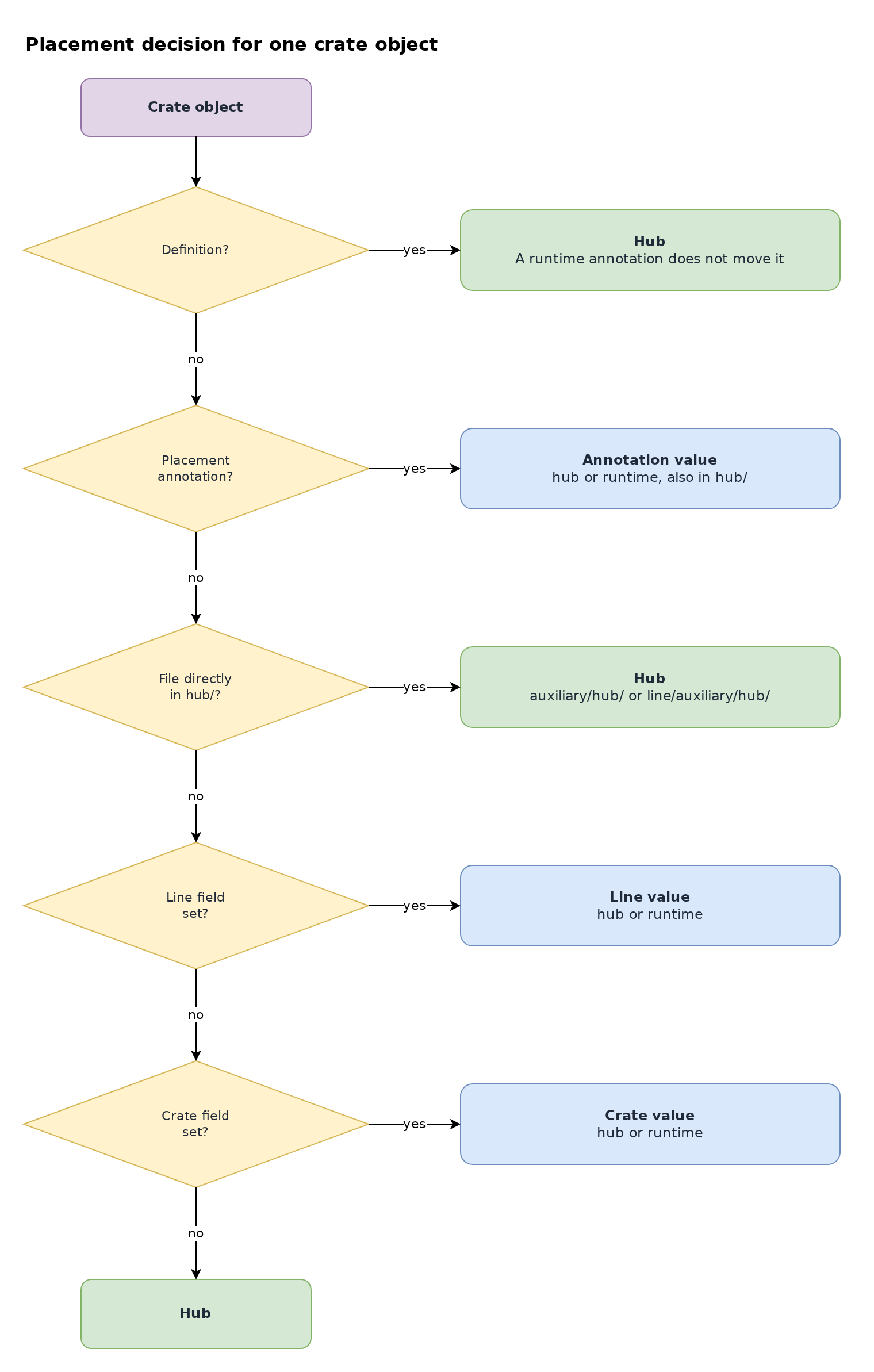
Yellow is a decision, green stays on the hub, and blue uses the annotation, the line field, or the crate field.
The only values are hub and runtime.
With rule 6, a crate with no marks keeps all objects on the hub. Crates that you published before this feature continue to install on the hub only.
For example, a crate store sets placement: "runtime" in _crate.cue. Line v1 sets placement: "runtime" in v1/_version.cue, and line v2 sets placement: "hub" in v2/_version.cue. The installer selects the cluster east-1.
| File | Directory | Annotation on the object | Where it lands | Rule |
|---|---|---|---|---|
auxiliary/defaults.yaml | Crate root auxiliary/ | None | east-1 | 5 |
auxiliary/hub/admission.yaml | Crate root auxiliary/hub/ | None | Hub | 3 |
auxiliary/hub/agent.yaml | Crate root auxiliary/hub/ | runtime | east-1 | 2 |
v1/auxiliary/bucket-defaults.yaml | Line v1/auxiliary/ | None | east-1 | 4 |
v1/auxiliary/pinned.yaml | Line v1/auxiliary/ | hub | Hub | 2 |
v1/auxiliary/hub/controller.yaml | Line v1/auxiliary/hub/ | None | Hub | 3 |
v2/auxiliary/migration.yaml | Line v2/auxiliary/ | None | Hub | 4 |
v1/definitions/bucket.cue | Line v1/definitions/ | runtime | Hub | 1 |
The line field applies only to the files of that line. The file in v2/auxiliary/ stays on the hub, while the file in the crate root auxiliary/ goes to east-1. All runtime objects of one install go to the same clusters.
Example: the aws-s3 crate for managed clusters
This is the crate from the Crossplane example, with lines v1 and v2. The provider, the functions, the XRD, the two Compositions, and the EnvironmentConfig must go to the managed clusters. A ConfigMap for a service catalog on the hub must stay on the hub.
aws-s3/
  _crate.cue                   placement: "runtime"
  auxiliary/
    packages.yaml              runtime, from _crate.cue
    xrd.yaml                   runtime, from _crate.cue
    settings.yaml              runtime, from _crate.cue
    hub/
      catalog-entry.yaml       hub, from the hub/ directory
  v1/
    _version.cue
    auxiliary/
      composition.yaml         runtime, from _crate.cue
    definitions/
      bucket.cue               hub. Definitions always install on the hub.
  v2/
    _version.cue
    auxiliary/
      composition.yaml         runtime, from _crate.cue
    definitions/
      bucket.cue               hub. Definitions always install on the hub.
The list above is the full order. This example uses the crate field and a hub/ directory. It does not show every row.
_crate.cue. Package 1.1.0 is package 1.0.1 of the Crossplane example, with the new placement field:
crate:     "aws-s3"
version:   "1.1.0"
placement: "runtime"
auxiliary/hub/catalog-entry.yaml:
apiVersion: v1
kind: ConfigMap
metadata:
  name: aws-s3-catalog
data:
  owner: team-storage
  summary: S3 buckets through Crossplane
  types: aws-s3/v1/bucket, aws-s3/v2/bucket
To make one object a hub object in a runtime crate, you can also add the annotation:
metadata:
  annotations:
    resource.oam.dev/placement: hub
Rules for the hub directory
- KubeVela reads only the files directly in
hub/. It does not read subdirectories ofhub/. - KubeVela ignores other subdirectories of
auxiliary/. - An annotation on an object is stronger than the
hub/directory. A file inhub/withresource.oam.dev/placement: runtimeis a runtime object.
vela crate publish shows a warning for each of these cases:
Warning: auxiliary/skipped is not a recognized folder and is ignored; only hub/ is recognized under auxiliary/
Warning: auxiliary/hub/nested is not read; hub/ does not recurse into sub-folders
Warning: auxiliary/hub/keep-runtime.yaml is in hub/ but its own placement annotation is "runtime"; the annotation wins, so it is not hub-only
Wrong values
vela crate publish rejects a value that is not hub or runtime. An empty string is also wrong.
Error: parse crate: read placement: _crate.cue: placement "spoke" is invalid, must be "hub" or "runtime"
Error: parse crate: read placement: _crate.cue: placement is empty, must be "hub" or "runtime"
Error: parse crate: read auxiliary: auxiliary/xrd.yaml: placement "edge" is invalid, must be "hub" or "runtime"
A definition with a placement annotation is accepted. The annotation stays on the definition, and the definition installs on the hub. For the value runtime, vela crate publish shows a warning:
Warning: v1/definitions/bucket.cue has placement annotation "runtime"; a definition stays on the hub, so the annotation is ignored
Select the clusters
With the CLI
--registry names a crate registry you already added. See Add a registry. These commands use ghcr. They install into the namespace platform, so the installer Application is crate-aws-s3-deploy in platform.
# Send the runtime objects to two clusters by name.
vela crate deploy aws-s3 --registry ghcr --version 1.1.0 --clusters east-1,east-2 -n platform

# Send them to all clusters with a label.
vela crate deploy aws-s3 --registry ghcr --version 1.1.0 --cluster-selector region=east -n platform

# Succeed when no cluster has the label yet.
vela crate deploy aws-s3 --registry ghcr --version 1.1.0 --cluster-selector tier=gpu --allow-empty -n platform
--cluster-selector takes one or more key=value pairs, separated by commas. A cluster must have all the labels.
--dry-run shows the placement property:
vela crate deploy aws-s3 --registry ghcr --version 1.1.0 --cluster-selector region=east -n platform --dry-run
apiVersion: core.oam.dev/v1beta1
kind: Application
metadata:
  name: crate-aws-s3-deploy
  namespace: platform
spec:
  components:
  - name: aws-s3
    properties:
      crate: aws-s3
      placement:
        clusterLabelSelector:
          region: east
      registry: ghcr
      version: 1.1.0
    type: crate
status: {}
The CLI checks the flags before it applies the Application:
| Flags | Error |
|---|---|
--clusters and --cluster-selector together | --clusters and --cluster-selector cannot be used together |
--allow-empty with no --clusters and no --cluster-selector | --allow-empty needs --clusters or --cluster-selector |
--clusters 'east-1,' | placement clusters must not contain an empty name |
With an Application
apiVersion: core.oam.dev/v1beta1
kind: Application
metadata:
  name: crate-aws-s3-deploy
  namespace: platform
spec:
  components:
    - name: aws-s3
      type: crate
      properties:
        registry: ghcr
        version: "1.1.0"
        placement:
          clusterLabelSelector:
            region: east
          # Or select clusters by name:
          # clusters: [east-1, east-2]
          # Succeed when clusterLabelSelector matches no cluster.
          # An unknown name in clusters still fails:
          # allowEmpty: true
Set clusters or clusterLabelSelector. Do not set both. The rule is the same as the rule of a topology policy.
Admission rejects a wrong placement. The error contains one of these messages:
placement | Message |
|---|---|
clusters and clusterLabelSelector | placement must set clusters or clusterLabelSelector, not both |
{} | placement must set clusters or clusterLabelSelector |
clusters: [] | placement clusters must name at least one cluster |
Results
placement | Runtime objects go to |
|---|---|
| Not set | The hub, with the hub objects |
clusters: [local] | The hub |
clusters: [east-1, east-2] | east-1 and east-2 only |
clusterLabelSelector: {region: east} | All clusters with the label region=east |
clusterLabelSelector: {} | All clusters, including the hub |
| A selector that matches no cluster | The runtime step fails. Objects already placed stay. |
A selector that matches no cluster, with allowEmpty: true | The install succeeds. KubeVela deletes the runtime objects already placed. The tier shows Not placed and no cluster selected. |
| A cluster name that does not exist | No cluster. The runtime step fails. |
All runtime objects of one install go to the same clusters. To send different objects to different clusters, use two crates.
What KubeVela creates
When the install has a placement, the owned Application crate-aws-s3 has two deploy steps:
deploy-crate-hubinstalls the hub objects and the definitions on the hub.deploy-crate-runtimeinstalls the runtime objects on the selected clusters.
Each auxiliary tier splits by class. The runtime part keeps the tier name. The name of the hub part ends with -hub, also when the tier has only hub objects. A definitions tier does not split. It is always a hub tier, and it keeps its name with no -hub.
| Tier | Class | Contents in the example |
|---|---|---|
aws-s3-aux | runtime | Provider, Functions, XRD, EnvironmentConfig |
aws-s3-aux-hub | hub | ConfigMap aws-s3-catalog |
aws-s3-v1-aux | runtime | Composition aws-s3-v1 |
aws-s3-v1-defs | hub | ComponentDefinition aws-s3-v1-bucket |
aws-s3-v2-aux | runtime | Composition aws-s3-v2 |
aws-s3-v2-defs | hub | ComponentDefinition aws-s3-v2-bucket |
The order inside a class does not change. A hub tier waits for the hub tier before it. A runtime tier waits for the runtime tier before it.
The hub step runs first. The definitions are available on the hub before the runtime step finishes. An Application that uses the definitions at that time can wait for the runtime objects on the managed cluster. Wait until the install is complete before you deliver workloads.
Look at the policies and the steps:
kubectl -n vela-system get application crate-aws-s3 -o yaml
vela status crate-aws-s3 -n vela-system
| Policy | Contents |
|---|---|
crate-hub | Topology that selects the cluster local |
crate-hub-override | Selects the hub tiers |
crate-runtime | Topology with the placement of the installer, with no changes |
crate-runtime-override | Selects the runtime tiers |
crate-state-keep | Apply-once policy with enable: false. Every owned Application has it, with or without a placement. |
vela status crate-aws-s3 -n vela-system shows the cluster of each tier. The Namespace column prints vela-system for every tier. The catalog ConfigMap and the definitions are in the install namespace. The column does not print the install namespace.
Command output
vela crate deploy waits for both steps. It shows one row for each tier, with no cluster column. With --allow-empty, a runtime tier that went to no cluster shows Not placed with the message no cluster selected. KubeVela also deletes the runtime objects already placed. A failed selector does not delete those objects.
Run vela workflow restart crate-<name> -n vela-system to retry a failed runtime step. A second vela crate deploy with the same flags does not run the failed step again.
If the runtime step fails, the command shows the failed step and returns an error:
Step deploy-crate-runtime failed: function call error for deploy: failed to find any cluster matches given labels
Error: application vela-system/crate-aws-s3 is in phase workflowFailed: step deploy-crate-runtime failed: function call error for deploy: failed to find any cluster matches given labels
Step deploy-crate-runtime failed: function call error for deploy: failed to get cluster east-9: virtualclusters.cluster.core.oam.dev "east-9" not found
Send workloads to the managed clusters
The definitions are on the hub. Write the Application on the hub, in the install namespace, and send the workload with a topology policy:
apiVersion: core.oam.dev/v1beta1
kind: Application
metadata:
  name: photos
  namespace: platform
spec:
  components:
    - name: photos
      type: aws-s3/v1/bucket
      properties:
        region: us-east-2
  policies:
    - name: east
      type: topology
      properties:
        clusterLabelSelector:
          region: east
KubeVela renders the ObjectBucket on the hub with aws-s3-v1-bucket. Then it sends the ObjectBucket to the region=east clusters. Crossplane on those clusters uses the Composition that the crate installed there, and creates the S3 bucket in us-east-2.
The namespace platform must exist on each selected cluster. If it does not exist, the workflow step fails:
function call error for deploy: Found 1 errors. [(error encountered in cluster east-1: Dispatch: pre-dispatch dryrun failed: Found 1 errors. [(cannot create object: namespaces "platform" not found)])]
Create the namespace, then run vela workflow restart photos -n platform.
Use the same selector for the crate and for the Applications. If an Application sends a workload to a cluster that does not have the runtime objects, the workload does not work on that cluster.
Change the clusters
Change placement on the installer Application, or run vela crate deploy again with new flags:
vela crate deploy aws-s3 --registry ghcr --version 1.1.0 --cluster-selector region=west -n platform
KubeVela installs the runtime objects on the new clusters. It deletes them from the clusters that the new placement does not select.
A label change on a cluster does not move an install. All topology policies work in this way.
-
A cluster with a new matching label receives the runtime objects the next time the owned workflow runs. To run it now, restart the workflow:
vela workflow restart crate-aws-s3 -n vela-system -
A cluster that loses a matching label keeps its objects. A workflow restart does not delete them.
Uninstall a crate
Delete the installer Application. KubeVela deletes the owned Application and the crate objects on the hub and on all managed clusters.
kubectl -n platform delete application crate-aws-s3-deploy
Next steps
- Place the crates of an addon: Crates in Addons.
- Learn about multi-cluster Applications: Multi Cluster Application.