Build and Publish a Crate
This page is for crate authors. It describes the package layout, the files in it, and how to publish a package version. For a full example, see Example: S3 Buckets with Crossplane.
Create the directory
vela crate init creates a crate directory that the parser accepts:
vela crate init aws-s3
vela crate init aws-s3 --path ./crates
aws-s3/
  _crate.cue           version "0.1.0", with TODO markers
  README.md
  auxiliary/           empty
  v1/
    _version.cue       apiVersion "v1"
    auxiliary/         empty
    definitions/
      example.cue
Edit the TODO markers. Rename example.cue and its "example" key to the name of your capability. Put supporting objects in auxiliary/ and v1/auxiliary/, or delete the empty directories.
If the target directory exists and is not empty, the command fails.
The layout
aws-s3/
  _crate.cue           Crate name and package version. Required.
  auxiliary/           Objects for all API lines. Optional.
  v1/                  API line v1.
    _version.cue       Line name and enabled flag. Required for each line.
    auxiliary/         Objects for line v1 only. Optional.
    definitions/       Definitions of line v1. One or more files.
  v2/
    _version.cue
    definitions/
KubeVela installs the parts in this order. Purple boxes are auxiliary objects, and green boxes are definitions.
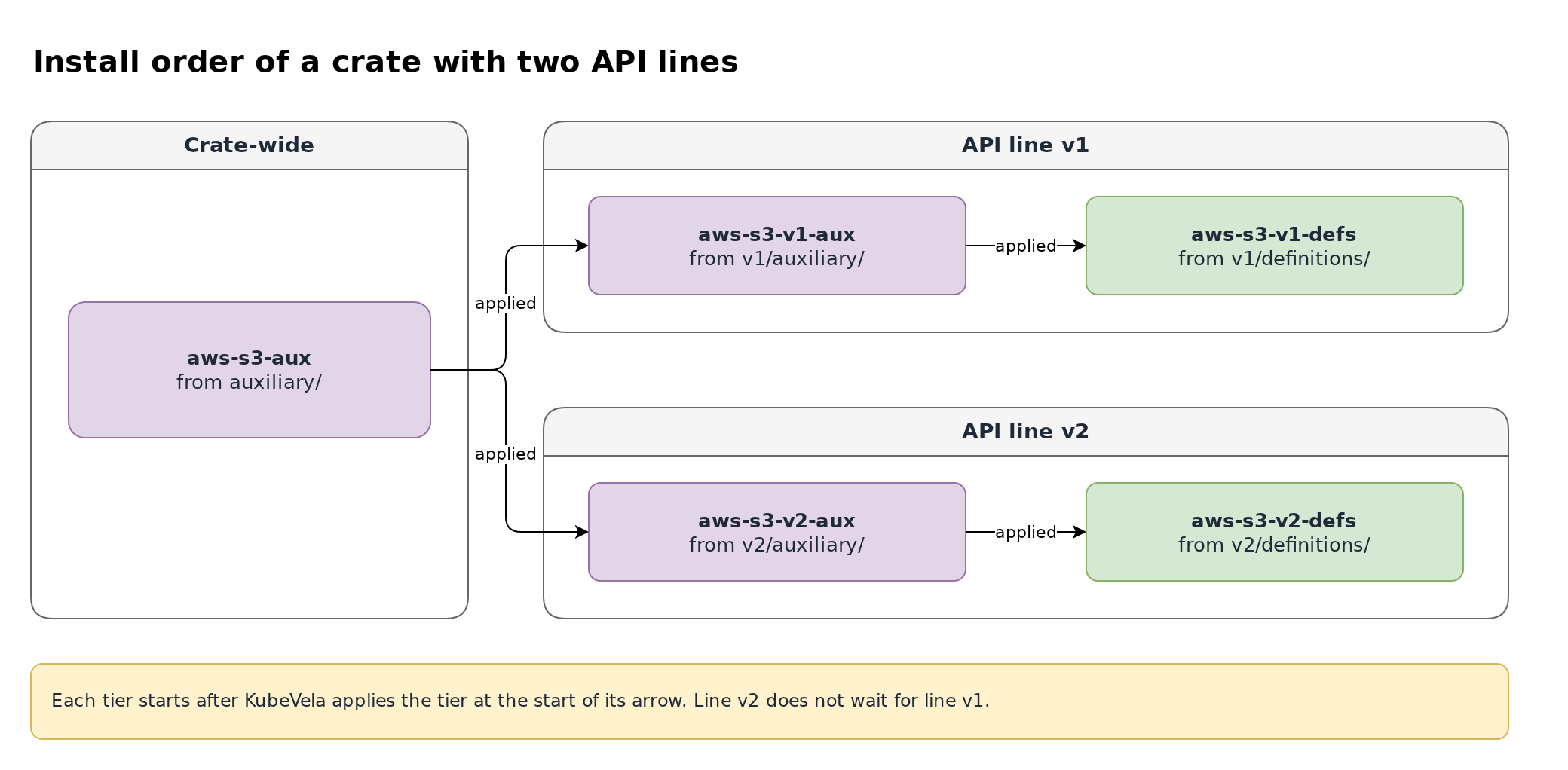
Each tier starts after KubeVela applies the tier before it. API lines do not wait for each other. Line v2 does not wait for line v1.
This order gives you two guarantees:
- Objects in
auxiliary/exist before the objects of a line that use them. For example, a Crossplane XRD exists before a Composition that refers to it. - The objects of a line exist before the definitions of that line.
For a crate with placement, the guarantees cover only the hub objects. The definitions wait for the hub tiers. The runtime tiers install in a later step on the managed clusters, so the definitions can be available before the runtime objects exist. See Crate Multi-Cluster Placement.
KubeVela does not wait until an object is ready. A definition can be available before the objects under it are ready. For example, Crossplane can still download a provider when Application teams can already use the definition. Tell the operators of your crate what to wait for.
_crate.cue
crate:       "aws-s3"
version:     "1.0.0"
description: "S3 buckets through Crossplane"
owners: ["team-storage"]
| Field | Rule |
|---|---|
crate | Required. A DNS-1123 label: 1 to 63 characters, lowercase letters, digits, and -. It must start and end with a letter or a digit. |
version | Required. major.minor.patch, with no v in front. It is the OCI tag. |
placement | Optional. hub or runtime. See Crate Multi-Cluster Placement. |
The parser ignores other fields, such as description and owners. People who read the package can still use them.
_version.cue
Each directory at the root of the crate whose name starts with v is an API line. The directory must contain _version.cue. KubeVela does not read the other directories at the root, for example a directory x1.
apiVersion: "v1"
enabled:    true
| Field | Rule |
|---|---|
apiVersion | Required. The name of the line, in the form vN, vNalphaN, or vNbetaN. N is a number. |
enabled | Optional. The default is true. If false, the line is in the package, but KubeVela does not install it. |
placement | Optional. hub or runtime. It replaces the placement of the crate for the objects of this line. |
The apiVersion in _version.cue is the name of the line. The directory name is not the line name. It only has to start with v. KubeVela uses apiVersion in the type and in the installed names. Give the directory the same name as the line, so that people can find the files of a line.
A line name is v and a number. Then, optionally, alpha or beta and a second number. A line name has no hyphen. Accepted names are v1, v2, v10, v1alpha1, v1alpha2, and v1beta1.
Use vN for a stable contract. Use an alpha or beta line for a preview of a new contract, for example v2beta1 before v2. A breaking change goes into a new line, also when the line is a preview. Each name is a separate line, so aws-s3/v2beta1/bucket and aws-s3/v2/bucket are different definitions.
Publish stops when apiVersion does not have one of these forms, for example "1", "one", or "v1-alpha1". The error contains this text:
apiVersion "1" in v1/_version.cue is invalid, must match ^v\d+(alpha\d+|beta\d+)?$
Publish also stops when two lines have the same apiVersion, also when their directories have different names:
Error: parse crate: duplicate line "v1" (from directory v2)
Use enabled: false for two purposes:
- To ship a line before it is ready. A later package version sets
enabled: true. - To retire a line. The files stay in the package, and KubeVela deletes the installed definitions and auxiliary objects of the line. For an example, see Retire line v1.
Install that later package with --version. The command is in Select a package version.
Definitions
Each file in <line>/definitions/ is one definition. A line must have one or more definitions.
CUE format
A CUE file has a key and a template block. The key is the capability name.
"bucket": {
	type:        "component"
	description: "AWS S3 bucket. Crossplane creates the bucket."
	attributes: workload: type: "autodetects.core.oam.dev"
}

template: {
	output: {
		apiVersion: "storage.example.org/v1alpha1"
		kind:       "ObjectBucket"
		metadata: name: context.name
		spec: region: parameter.region
	}
	parameter: region: *"us-east-1" | string
}
type is component, trait, policy, workflow-step, or workload. The format is the same as the format of vela def. See Manage Definition.
Use workload: type: "autodetects.core.oam.dev" when the output kind comes from a CRD that the crate creates. With workload: definition, the CRD must exist when KubeVela applies the definition. A CRD that a controller creates later, such as the CRD that Crossplane creates from an XRD, can be absent at that time. The definitions tier then fails with an error like this:
admission webhook "mutating.core.oam-dev.v1beta1.componentdefinitions" denied the request: no matches for kind "ObjectBucket" in version "storage.example.org/v1alpha1"
YAML format
A YAML file is a full definition object, the same object that you can apply with kubectl. metadata.name is the capability name. Use this format when another tool generates the definition.
apiVersion: core.oam.dev/v1beta1
kind: TraitDefinition
metadata:
  name: tags
  annotations:
    definition.oam.dev/description: Add tags to a bucket.
spec:
  appliesToWorkloads:
    - "*"
  schematic:
    cue:
      template: |
        patch: spec: tags: parameter.tags
        parameter: tags: [string]: string
The parser checks that metadata.name is a valid name. The cluster checks the rest of a YAML definition when KubeVela applies it.
The installed name
KubeVela installs each definition as <crate>-<apiVersion>-<capability>, for example aws-s3-v1-bucket. It also adds the labels definition.oam.dev/crate, definition.oam.dev/crate-api-version, and definition.oam.dev/name. Application teams use the type aws-s3/v1/bucket.
The installed definition also has the fields spec.crate and spec.apiVersion, for example aws-s3 and v1, and the annotation definition.oam.dev/crate-full-name. The annotation holds the full <crate>-<apiVersion>-<capability> name, because KubeVela shortens an installed name that is too long.
spec.crate is the field that makes a definition crate-backed. The check on a one-part type reads this field. If the definition that a one-part type names has spec.crate, admission rejects the Application.
You can apply a definition with these fields yourself. Admission accepts it when spec.crate and spec.apiVersion are both set, and rejects it when only one of them is set. KubeVela then handles the definition as crate-backed. An Application cannot use its name as a one-part type. The three-part type works only when the name of the definition is <crate>-<apiVersion>-<capability>.
Auxiliary objects
Put an object in auxiliary/ when all lines use it. Put an object in <line>/auxiliary/ when only that line uses it.
| Use | Location |
|---|---|
| Crossplane XRD. One XRD serves all versions of a composite type. | auxiliary/ |
| Crossplane Provider and Function packages | auxiliary/ |
| Crossplane Composition for one API line | <line>/auxiliary/ |
| KRO ResourceGraphDefinition | <line>/auxiliary/ |
| ConfigMap or Crossplane EnvironmentConfig with defaults | auxiliary/, or <line>/auxiliary/ when the defaults are different for each line |
| RBAC rules | The location of the objects that need them |
A file is .yaml, .yml, or .cue. Publish stops on a file with a different extension.
- A YAML file contains one or more Kubernetes objects, separated by
---. - A CUE file contains one object at its root. Do not put the object under a key.
apiVersion: "v1"
kind:       "ConfigMap"
metadata: name: "aws-s3-v1-settings"
data: line: "v1"
KubeVela installs every file directly in auxiliary/ and in <line>/auxiliary/. It does not read subdirectories, with one exception: a hub/ directory. KubeVela reads auxiliary/hub/ and <line>/auxiliary/hub/. See Crate Multi-Cluster Placement.
If a namespaced object does not set metadata.namespace, KubeVela creates it in the install namespace. If the object sets a namespace, KubeVela keeps that namespace. A cluster-scoped object, such as an XRD, has no namespace.
Publish
vela crate publish parses the directory, checks it, and pushes it. By default, the tag is the version field in _crate.cue. To push with a different tag, see Version rules.
Add the registry before you publish. The URL is a positional argument. There is no --url flag. Read the password from stdin. For GitHub Container Registry, the password is a GitHub token with the write:packages scope. The read:packages scope is sufficient only to install a crate. Use your GitHub user name as the username.
printf '%s' "$GITHUB_TOKEN" | vela crate registry add ghcr oci://ghcr.io/myorg/crates \
  --username my-github-user --password-stdin
The registry page documents the Secret and a private package. See Example: private packages on GHCR. For publish with no cluster connection, see Publish credentials.
vela crate publish ./aws-s3 --registry ghcr
Check the target and the package annotations first. --dry-run does not push:
vela crate publish ./aws-s3 --registry ghcr --dry-run
Would publish ghcr.io/myorg/crates/aws-s3:1.0.0
  crates.oam.dev/crate: aws-s3
  crates.oam.dev/enabled-lines: v1,v2
  crates.oam.dev/lines: v1,v2
The command gives the registry name, ghcr. The output shows the URL of that registry, ghcr.io/myorg/crates, then the crate name and the tag.
An omitted --registry uses the selected default. That default is the wrong registry when you publish somewhere else. Pass --registry with the registry you publish to. The rules are in How KubeVela selects the registry.
lines lists all lines in the package. enabled-lines lists the lines that KubeVela installs. After a line is retired with enabled: false, the line is in lines but not in enabled-lines.
Version rules
A published tag is immutable. To publish a change, increase version in _crate.cue and publish again. If the tag exists, publish stops with this error:
ghcr.io/myorg/crates/aws-s3:1.0.0 is already published; bump version in ./aws-s3/_crate.cue and publish again, or pass --force to overwrite
| Flag | Use |
|---|---|
--version 1.1.0-rc1 | Push with a different tag. The version inside the package does not change. The value must be semver. |
--force | Replace a tag that exists. Use it only for test tags, for example a release candidate. |
Select a package version
Use the package version to show the operator what changed:
| Change | Package version | API line |
|---|---|---|
| Fix a template. The parameters do not change. | Increase the patch number, for example 1.0.1. | Same line |
| Add an optional parameter. | Increase the minor number, for example 1.1.0. | Same line |
| Rename a parameter, or add a required parameter. | Increase the minor number. | New line, for example v2. Keep v1. |
Retire line v1, after all Applications use v2. | Increase the major number, for example 2.0.0. | Delete the v1 directory, or set enabled: false. |
An API line is a promise to Application teams. Do not make a breaking change to a line that you published. KubeVela does not check that a change to a line is compatible.
When you publish a new package version, install that version with --version. This includes a package that sets enabled: false on a line. For the reason, see Pin the version.
vela crate deploy aws-s3 --registry ghcr --version 2.0.0 -n crate-test
Test a crate
- Add the registry with the command in Publish.
- Publish the package to that registry.
- Install the crate with
vela crate deployinto a test namespace. - Apply an Application that uses the
bucketdefinition. - Run
vela statuson your Application, on the installer, and on the owned Application.
Pass --version on each install. See Pin the version.
printf '%s' "$GITHUB_TOKEN" | vela crate registry add ghcr oci://ghcr.io/myorg/crates \
  --username my-github-user --password-stdin
vela crate publish ./aws-s3 --registry ghcr
kubectl create namespace crate-test
vela crate deploy aws-s3 --registry ghcr --version 1.0.0 -n crate-test
For a registry with no TLS, pass an http:// URL and no password:
vela crate registry add dev http://registry.local:5000/crates
vela crate publish ./aws-s3 --registry dev
vela crate deploy aws-s3 --registry dev -n crate-test
The registry URL must work from your workstation and from the cluster. See A registry URL must work from two places.
An omitted --registry uses the selected default. That default is the wrong registry when you publish somewhere else. See How KubeVela selects the registry.
The bucket definition takes a region property. Apply this Application in the install namespace:
apiVersion: core.oam.dev/v1beta1
kind: Application
metadata:
  name: photos
  namespace: crate-test
spec:
  components:
    - name: photos
      type: aws-s3/v1/bucket
      properties:
        region: eu-west-1
Pass -n on each vela status command. The CLI prints the Application name and the namespace.
vela status photos -n crate-test
vela status crate-aws-s3-deploy -n crate-test
vela status crate-aws-s3 -n vela-system
photos is your Application in crate-test. The installer Application is crate-aws-s3-deploy in that same namespace. The owned Application name is crate-aws-s3 in vela-system.
About:

  Name:      	photos
  Namespace: 	crate-test
About:

  Name:      	crate-aws-s3-deploy
  Namespace: 	crate-test
About:

  Name:      	crate-aws-s3
  Namespace: 	vela-system
To check that the install is complete, use the tier table that vela crate deploy prints, or vela status crate-aws-s3 -n vela-system. See Check the install.