Example: S3 Buckets with Crossplane
This example builds the aws-s3 crate with two API lines, v1 and v2. One package installs both lines in the same cluster. Application teams in one namespace can use aws-s3/v1/bucket and aws-s3/v2/bucket at the same time. They do not need to know Crossplane.
The two lines are two contracts for the same S3 bucket:
| Line | Type | Parameters |
|---|---|---|
v1 | aws-s3/v1/bucket | region (optional) and tags |
v2 | aws-s3/v2/bucket | location (required), owner (required), and tags |
Line v2 changes the name of region to location, and it adds the required parameter owner. These are breaking changes, so they are in a new line. Applications that use v1 do not change.
The crate contains:
- The Crossplane packages that the buckets need: the AWS S3 provider and three composition functions. Both lines use them.
- A Crossplane XRD. It defines the
ObjectBucketAPI. Both lines use it. - A Crossplane EnvironmentConfig. It holds the default region and the default tags of the platform. Both lines use it.
- One Crossplane Composition for each line,
aws-s3-v1andaws-s3-v2. A Composition changes anObjectBucketinto an AWS S3Bucket. - One KubeVela ComponentDefinition for each line,
aws-s3-v1-bucketandaws-s3-v2-bucket. A definition changes a component of an Application into anObjectBucket.
How the parts work together
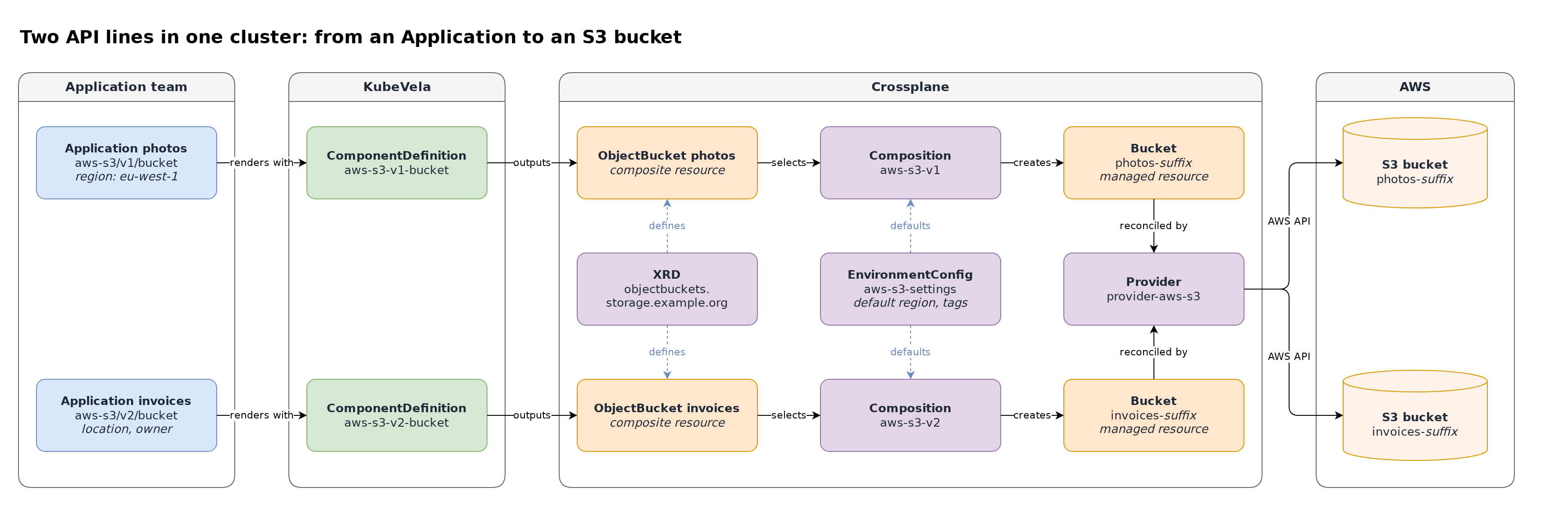
The diagram shows two Applications in the namespace team-a. photos uses line v1, and invoices uses line v2. Follow each row from left to right:
- KubeVela renders the component with the definition of its line,
aws-s3-v1-bucketoraws-s3-v2-bucket. - The definition outputs an
ObjectBucketin the namespace of the Application. - The
ObjectBucketselects the Composition of the same line,aws-s3-v1oraws-s3-v2. - The Composition reads the defaults from the EnvironmentConfig
aws-s3-settings. Crossplane compositions read an EnvironmentConfig, not a ConfigMap. An EnvironmentConfig holds key-value data in the same way as a ConfigMap. - The Composition creates a
Bucketmanaged resource. - The provider
provider-aws-s3creates the bucket in AWS.
The middle row shows the objects that the two lines share: the XRD, the EnvironmentConfig, and the provider. Each line has its own definition and its own Composition.
In the diagram, the crate installs the purple objects. The green objects are the definitions from the crate. Crossplane creates the orange objects for each bucket. The blue objects are the Applications of the application teams.
Before you start
The crate installs the provider, the functions, and the Crossplane objects. You must supply two items that the crate cannot carry:
- Crossplane v2 on the cluster. See Install Crossplane. Crossplane serves the
ProviderandFunctionAPIs, so it must be on the cluster before the crate. - AWS credentials for the provider. The credentials are secret and are different for each cluster, so do not put them in the crate. You add them after the provider is Healthy. See Add the AWS credentials.
To install Crossplane and the crate together, put Crossplane in the resources/ directory of an addon, and put the crate in the same addon. See Crates in Addons.
We tested this page with Crossplane v2.4, provider-aws-s3 v2.9.0, and the function versions in packages.yaml. Check the fields against the versions that you use.
The files
aws-s3/
  _crate.cue
  auxiliary/
    packages.yaml
    xrd.yaml
    settings.yaml
  v1/
    _version.cue
    auxiliary/
      composition.yaml
    definitions/
      bucket.cue
  v2/
    _version.cue
    auxiliary/
      composition.yaml
    definitions/
      bucket.cue
_crate.cue
crate:   "aws-s3"
version: "1.0.0"
auxiliary/packages.yaml
The provider and the functions are Crossplane packages. All API lines use them, so they are in auxiliary/. One file can contain many objects. Separate them with ---.
apiVersion: pkg.crossplane.io/v1
kind: Provider
metadata:
  name: provider-aws-s3
spec:
  package: xpkg.crossplane.io/crossplane-contrib/provider-aws-s3:v2.9.0
---
apiVersion: pkg.crossplane.io/v1
kind: Function
metadata:
  name: function-environment-configs
spec:
  package: xpkg.crossplane.io/crossplane-contrib/function-environment-configs:v0.9.2
---
apiVersion: pkg.crossplane.io/v1
kind: Function
metadata:
  name: function-patch-and-transform
spec:
  package: xpkg.crossplane.io/crossplane-contrib/function-patch-and-transform:v0.11.2
---
apiVersion: pkg.crossplane.io/v1
kind: Function
metadata:
  name: function-auto-ready
spec:
  package: xpkg.crossplane.io/crossplane-contrib/function-auto-ready:v0.7.3
To upgrade the provider or a function, change the package tag in this file and publish a new package version. The provider and the functions are cluster-scoped, so they have no namespace.
auxiliary/xrd.yaml
One XRD serves all versions of a composite type, so the XRD is in auxiliary/. All API lines share it.
apiVersion: apiextensions.crossplane.io/v2
kind: CompositeResourceDefinition
metadata:
  name: objectbuckets.storage.example.org
spec:
  group: storage.example.org
  names:
    kind: ObjectBucket
    plural: objectbuckets
  scope: Namespaced
  versions:
    - name: v1alpha1
      served: true
      referenceable: true
      schema:
        openAPIV3Schema:
          type: object
          properties:
            spec:
              type: object
              properties:
                region:
                  type: string
                  description: AWS region. Empty uses the platform default.
                tags:
                  type: object
                  additionalProperties:
                    type: string
auxiliary/settings.yaml
The platform team keeps its defaults here. Both lines read this object. To change a default, edit this file and publish a new package version. Application teams do not change.
apiVersion: apiextensions.crossplane.io/v1beta1
kind: EnvironmentConfig
metadata:
  name: aws-s3-settings
data:
  defaultRegion: us-east-1
  tags:
    managed-by: kubevela
    cost-center: platform
v1/_version.cue and v2/_version.cue
Each line has its own _version.cue. Both lines are enabled.
apiVersion: "v1"
enabled:    true
apiVersion: "v2"
enabled:    true
v1/auxiliary/composition.yaml
The Composition is the logic behind line v1, so it is in v1/auxiliary/. KubeVela applies it after the XRD.
apiVersion: apiextensions.crossplane.io/v1
kind: Composition
metadata:
  name: aws-s3-v1
spec:
  compositeTypeRef:
    apiVersion: storage.example.org/v1alpha1
    kind: ObjectBucket
  mode: Pipeline
  pipeline:
    - step: load-settings
      functionRef:
        name: function-environment-configs
      input:
        apiVersion: environmentconfigs.fn.crossplane.io/v1beta1
        kind: Input
        spec:
          environmentConfigs:
            - type: Reference
              ref:
                name: aws-s3-settings
    - step: bucket
      functionRef:
        name: function-patch-and-transform
      input:
        apiVersion: pt.fn.crossplane.io/v1beta1
        kind: Resources
        resources:
          - name: bucket
            base:
              apiVersion: s3.aws.m.upbound.io/v1beta1
              kind: Bucket
              spec:
                forProvider: {}
            patches:
              - type: FromEnvironmentFieldPath
                fromFieldPath: defaultRegion
                toFieldPath: spec.forProvider.region
              - type: FromEnvironmentFieldPath
                fromFieldPath: tags
                toFieldPath: spec.forProvider.tags
              - type: FromCompositeFieldPath
                fromFieldPath: spec.region
                toFieldPath: spec.forProvider.region
              - type: FromCompositeFieldPath
                fromFieldPath: spec.tags
                toFieldPath: spec.forProvider.tags
                policy:
                  toFieldPath: MergeObjects
    - step: ready
      functionRef:
        name: function-auto-ready
The patches run in order. The default region applies first. If the ObjectBucket sets spec.region, that value replaces the default. The tags of the Application merge with the tags of the platform.
v2/auxiliary/composition.yaml
This file is a copy of v1/auxiliary/composition.yaml. Only metadata.name is different:
metadata:
  name: aws-s3-v2
Each line has its own Composition. The platform team can then change the Composition of v2, and the buckets of v1 do not change.
v1/definitions/bucket.cue
This file is the contract of line v1. It has two parameters, region and tags.
"bucket": {
	type:        "component"
	description: "AWS S3 bucket. Crossplane creates the bucket."
	attributes: {
		workload: type: "autodetects.core.oam.dev"
		status: healthPolicy: #"""
			isHealth: *false | bool
			if context.output.status.conditions != _|_ {
				isHealth: len([for c in context.output.status.conditions if c.type == "Ready" && c.status == "True" {c}]) > 0
			}
			"""#
	}
}

template: {
	output: {
		apiVersion: "storage.example.org/v1alpha1"
		kind:       "ObjectBucket"
		metadata: name: context.name
		spec: {
			crossplane: compositionRef: name: "aws-s3-v1"
			if parameter.region != _|_ {
				region: parameter.region
			}
			tags: parameter.tags
		}
	}
	parameter: {
		// +usage=AWS region. If you do not set it, the platform default applies.
		region?: string
		// +usage=Tags to add to the bucket. They merge with the platform tags.
		tags: *{} | {[string]: string}
	}
}
v2/definitions/bucket.cue
This file is the contract of line v2. location replaces region, and it is required. owner is required. KubeVela adds the owner to the bucket as the tag owner.
"bucket": {
	type:        "component"
	description: "AWS S3 bucket with a required owner. Crossplane creates the bucket."
	attributes: {
		workload: type: "autodetects.core.oam.dev"
		status: healthPolicy: #"""
			isHealth: *false | bool
			if context.output.status.conditions != _|_ {
				isHealth: len([for c in context.output.status.conditions if c.type == "Ready" && c.status == "True" {c}]) > 0
			}
			"""#
	}
}

template: {
	output: {
		apiVersion: "storage.example.org/v1alpha1"
		kind:       "ObjectBucket"
		metadata: name: context.name
		spec: {
			crossplane: compositionRef: name: "aws-s3-v2"
			region: parameter.location
			tags: parameter.tags & {owner: parameter.owner}
		}
	}
	parameter: {
		// +usage=AWS region of the bucket
		location: string
		// +usage=Team that owns the bucket. KubeVela adds it as the tag "owner".
		owner: string
		// +usage=Other tags to add to the bucket
		tags: *{} | {[string]: string}
	}
}
The two definitions have these points in common:
workload: type: "autodetects.core.oam.dev"is necessary. Crossplane creates theObjectBucketCRD from the XRD after KubeVela applies the XRD. Withworkload: definition, admission rejects the definition while that CRD does not exist. The error isno matches for kind "ObjectBucket" in version "storage.example.org/v1alpha1".compositionRefselects the Composition of the line. Each line selects its own Composition, so a change to one line does not change the buckets of the other line.healthPolicymakes the component healthy only when Crossplane reports that the bucket isReady.
Both lines write the same XRD version, v1alpha1. An API line is the contract of the KubeVela definition. It does not have to match a version of the XRD.
Publish and install
Add a crate registry before these commands. --registry names a registry you added. See Add a registry.
These commands use the name ghcr.
Create the install namespace before you deploy:
kubectl create namespace team-a
Check the package first. The dry run lists both lines, and both lines are enabled:
vela crate publish ./aws-s3 --registry ghcr --dry-run
Would publish ghcr.io/myorg/crates/aws-s3:1.0.0
  crates.oam.dev/crate: aws-s3
  crates.oam.dev/enabled-lines: v1,v2
  crates.oam.dev/lines: v1,v2
The host in that output is the URL of the registry you added. The name in the command and that host are the same registry.
Publish the package and install it in team-a:
vela crate publish ./aws-s3 --registry ghcr
vela crate deploy aws-s3 --registry ghcr --version 1.0.0 -n team-a
Applied Application team-a/crate-aws-s3-deploy
Rendering crate (install tiers are not known yet)...
TIER          	STATUS 	MESSAGE
aws-s3-aux    	Healthy
aws-s3-v1-aux 	Healthy
aws-s3-v1-defs	Healthy
aws-s3-v2-aux 	Healthy
aws-s3-v2-defs	Healthy
Crate "aws-s3" (version 1.0.0) is installed in namespace "team-a"
Each line has an auxiliary tier and a definitions tier. Both lines start after aws-s3-aux. Line v2 does not wait for line v1.
Check the installed objects:
kubectl get providers.pkg.crossplane.io provider-aws-s3
kubectl get functions.pkg.crossplane.io
kubectl get compositeresourcedefinitions objectbuckets.storage.example.org
kubectl get environmentconfigs aws-s3-settings
kubectl get compositions
kubectl -n team-a get componentdefinitions -l definition.oam.dev/crate=aws-s3
The last two commands show one Composition and one definition for each line:
NAME        XR-KIND        XR-APIVERSION                  AGE
aws-s3-v1   ObjectBucket   storage.example.org/v1alpha1   1m
aws-s3-v2   ObjectBucket   storage.example.org/v1alpha1   1m

NAME               WORKLOAD-KIND   DESCRIPTION
aws-s3-v1-bucket                   AWS S3 bucket. Crossplane creates the bucket.
aws-s3-v2-bucket                   AWS S3 bucket with a required owner. Crossplane creates the bucket.
The aws-s3-aux tier is healthy when the cluster accepts its objects. Crossplane needs more time to download the provider and the functions, and to create the ObjectBucket CRD from the XRD. Wait for these before you create the first bucket:
kubectl wait providers.pkg.crossplane.io/provider-aws-s3 \
  --for=condition=Healthy --timeout=5m
kubectl wait functions.pkg.crossplane.io --all \
  --for=condition=Healthy --timeout=5m
kubectl wait compositeresourcedefinitions objectbuckets.storage.example.org \
  --for=condition=Established --timeout=2m
Crossplane also installs crossplane-contrib-provider-family-aws, a dependency of provider-aws-s3. It is not a crate object. KubeVela does not delete it when you uninstall the crate.
Add the AWS credentials
A namespaced Bucket uses the ClusterProviderConfig named default when the Bucket does not name a provider config.
Create the Secret and the ClusterProviderConfig after the provider is Healthy. The provider installs the ClusterProviderConfig CRD. Create both objects after that CRD exists.
./aws-credentials.ini is an AWS shared credentials file. It has one profile and two keys. A real cluster uses real credentials. The key names are in the AWS credentials file. The provider reads the file from the Secret key credentials.
[default]
aws_access_key_id = <access-key-id>
aws_secret_access_key = <secret-access-key>
kubectl -n crossplane-system create secret generic aws-creds \
  --from-file=credentials=./aws-credentials.ini
Apply one ClusterProviderConfig. Do not merge the two specs below.
For AWS, save this spec as cluster-provider-config.yaml:
apiVersion: aws.m.upbound.io/v1beta1
kind: ClusterProviderConfig
metadata:
  name: default
spec:
  credentials:
    source: Secret
    secretRef:
      namespace: crossplane-system
      name: aws-creds
      key: credentials
kubectl apply -f cluster-provider-config.yaml
To test the crate with no AWS account, use LocalStack. Save this spec instead. It is the full object. It includes the Secret reference and the LocalStack endpoint:
apiVersion: aws.m.upbound.io/v1beta1
kind: ClusterProviderConfig
metadata:
  name: default
spec:
  credentials:
    source: Secret
    secretRef:
      namespace: crossplane-system
      name: aws-creds
      key: credentials
  endpoint:
    hostnameImmutable: true
    url:
      type: Static
      static: http://localstack.internal:4566
    services: [s3, s3control, sts]
  skip_credentials_validation: true
  skip_metadata_api_check: true
  skip_requesting_account_id: true
  s3_use_path_style: true
kubectl apply -f cluster-provider-config.yaml
The cluster that runs the provider must resolve localstack.internal. Resolve that hostname, not an IP address. On this page the provider runs on the hub. On managed clusters, each cluster that runs the provider must resolve it. The provider calls S3 Control at <account-id>.<endpoint host>. The services list must include s3control.
Use both lines at the same time
Two application teams in team-a create a bucket each. The photos team uses line v1:
apiVersion: core.oam.dev/v1beta1
kind: Application
metadata:
  name: photos
  namespace: team-a
spec:
  components:
    - name: photos
      type: aws-s3/v1/bucket
      properties:
        region: eu-west-1
        tags:
          team: photos
The invoices team uses line v2:
apiVersion: core.oam.dev/v1beta1
kind: Application
metadata:
  name: invoices
  namespace: team-a
spec:
  components:
    - name: invoices
      type: aws-s3/v2/bucket
      properties:
        location: eu-central-1
        owner: team-billing
        tags:
          team: invoices
Save the first Application as photos.yaml. Save the second Application as invoices.yaml. Apply both files:
kubectl apply -f photos.yaml
kubectl apply -f invoices.yaml
Each definition writes an ObjectBucket that selects the Composition of its line:
kubectl -n team-a get objectbuckets -o custom-columns=NAME:.metadata.name,COMPOSITION:.spec.crossplane.compositionRef.name,REGION:.spec.region,TAGS:.spec.tags
NAME       COMPOSITION   REGION         TAGS
invoices   aws-s3-v2     eu-central-1   map[owner:team-billing team:invoices]
photos     aws-s3-v1     eu-west-1      map[team:photos]
The two lines write the same ObjectBucket fields from different parameters. Line v1 copies region when the component sets it. Line v2 copies location to region, and it adds owner to the tags.
Crossplane creates one Bucket managed resource for each ObjectBucket, and the provider creates the S3 bucket. Crossplane gives each Bucket a generated name, for example photos-6f9223c41fe1. The S3 bucket has the same name. Check the result:
vela status photos -n team-a
vela status invoices -n team-a
kubectl -n team-a get buckets.s3.aws.m.upbound.io
Each S3 bucket also has the platform tags managed-by: kubevela and cost-center: platform. The provider adds crossplane-* tags.
If a component on line v2 does not set owner, the result depends on the feature gate EnableCueValidation:
- With the gate off, which is the default, admission accepts the Application. The workflow step of the component then fails with
Parameter errors, and the message containsparameter.owner: incomplete value string. - With the gate on, admission rejects the Application. The error contains
missing parameters: owner.
To delete a bucket, delete its Application. Crossplane then deletes the S3 bucket.
Change the defaults
Both lines read the EnvironmentConfig aws-s3-settings. A change to a default applies to the buckets of both lines.
To change a default, edit auxiliary/settings.yaml, change version in _crate.cue to 1.0.1, and publish. For example, change the tag cost-center to storage:
data:
  defaultRegion: us-east-1
  tags:
    managed-by: kubevela
    cost-center: storage
vela crate publish ./aws-s3 --registry ghcr
vela crate deploy aws-s3 --registry ghcr --version 1.0.1 -n team-a
The Applications do not change. Crossplane applies the new tag to the buckets of both lines, including the buckets that exist.
A new default also applies to the buckets that exist. Some fields of an S3 bucket cannot change. For example, if you change defaultRegion, the provider refuses to update each bucket that uses the default:
refuse to update the external resource because the following update requires replacing it: cannot change the value of the argument "region" from "us-east-1" to "us-west-2"
Only new buckets get the new region. To change such a default, add a new API line with its own EnvironmentConfig.
Move an Application to v2
The photos team now moves its bucket from line v1 to line v2. The v2 contract is different, so the team changes the type and the properties:
- Change
typetoaws-s3/v2/bucket. - Change the name of
regiontolocation. Keep the value. The region of an S3 bucket cannot change. If you set a different region, the provider refuses to update the bucket, with the same error as in Change the defaults. - Add
owner, because linev2requires it.
apiVersion: core.oam.dev/v1beta1
kind: Application
metadata:
  name: photos
  namespace: team-a
spec:
  components:
    - name: photos
      type: aws-s3/v2/bucket
      properties:
        location: eu-west-1
        owner: team-photos
        tags:
          team: photos
Apply the file again:
kubectl apply -f photos.yaml
KubeVela renders the component with aws-s3-v2-bucket. The ObjectBucket keeps its name, and it now selects the Composition aws-s3-v2:
NAME       COMPOSITION   REGION         TAGS
invoices   aws-s3-v2     eu-central-1   map[owner:team-billing team:invoices]
photos     aws-s3-v2     eu-west-1      map[owner:team-photos team:photos]
The Application invoices does not change. For the general rules, see Move to a new API line.
Retire line v1
When no Application uses line v1, the platform team can retire it.
-
Find the
ObjectBucketobjects that still select the Composition ofv1:kubectl get objectbuckets -A -o custom-columns=NAMESPACE:.metadata.namespace,NAME:.metadata.name,COMPOSITION:.spec.crossplane.compositionRef.nameNAMESPACE NAME COMPOSITIONteam-a invoices aws-s3-v2team-a photos aws-s3-v2No object uses
aws-s3-v1. -
Set
enabled: falseinv1/_version.cue. The files ofv1stay in the package.apiVersion: "v1"enabled: false -
Set
version: "2.0.0"in_crate.cue. A retired line is a major change. Check the package and publish it:vela crate publish ./aws-s3 --registry ghcr --dry-runWould publish ghcr.io/myorg/crates/aws-s3:2.0.0crates.oam.dev/crate: aws-s3crates.oam.dev/enabled-lines: v2crates.oam.dev/lines: v1,v2vela crate publish ./aws-s3 --registry ghcr -
Install the new package version:
vela crate deploy aws-s3 --registry ghcr --version 2.0.0 -n team-aApplied Application team-a/crate-aws-s3-deployTIER STATUS MESSAGEaws-s3-aux Healthyaws-s3-v1-aux Healthyaws-s3-v1-defs Healthyaws-s3-v2-aux Healthyaws-s3-v2-defs HealthyTIER STATUS MESSAGEaws-s3-aux Healthyaws-s3-v2-aux Healthyaws-s3-v2-defs HealthyCrate "aws-s3" (version 2.0.0) is installed in namespace "team-a"The first table shows the tiers of the previous version. The second table shows the tiers of
2.0.0.
KubeVela deletes the definition aws-s3-v1-bucket and the Composition aws-s3-v1. The objects of line v2 do not change:
kubectl -n team-a get componentdefinitions -l definition.oam.dev/crate=aws-s3
kubectl get compositions
NAME               WORKLOAD-KIND   DESCRIPTION
aws-s3-v2-bucket                   AWS S3 bucket with a required owner. Crossplane creates the bucket.

NAME        XR-KIND        XR-APIVERSION                  AGE
aws-s3-v2   ObjectBucket   storage.example.org/v1alpha1   30m
If an Application still uses line v1 when you install 2.0.0, these things occur:
- The
ObjectBucketof the Application stays. Crossplane cannot reconcile it, because the Compositionaws-s3-v1does not exist. TheSyncedcondition of theObjectBucketis false, with the messagecannot fetch Composition: cannot get Composition: Composition.apiextensions.crossplane.io "aws-s3-v1" not found. - Admission rejects every change to the Application. The error contains
WorkloadDefinition.core.oam.dev "aws-s3-v1-bucket" not found. - The Application shows a
Parsedcondition that is false, with the same message.Readyis false too. Checkvela statusforParsed=False, not just the Healthy line.
To recover, install a package version that enables v1, for example 1.0.1. KubeVela installs the definition and the Composition of v1 again. Then move the Application to v2, and install 2.0.0 again.
Next steps
- Send the provider, the functions, and the Crossplane objects to managed clusters: Crate Multi-Cluster Placement.
- Ship Crossplane and the crate together: Crates in Addons.