Debugging KubeVela with Webhook Integration
This guide demonstrates how to set up a local debugging environment for KubeVela with webhook integration enabled. This setup allows you to debug the controller alongside its webhook server, making it easier to identify and resolve issues in real-time during development.
Prerequisites
Before you begin, ensure you have:
- KubeVela source code cloned from github.com/kubevela/kubevela
- Go 1.19 or later installed
- A running Kubernetes cluster accessible via
~/.kube/config kubectlandopensslinstalled- An IDE with Go debugger support (VS Code or IntelliJ IDEA / GoLand)
For basic controller debugging without webhooks, see Debugging KubeVela Controllers.
Overview
When debugging with webhooks enabled, the KubeVela controller runs locally with an HTTPS server that handles admission webhook requests from your Kubernetes cluster. This requires:
- SSL certificates for the webhook server
- Webhook configuration in the source code
- Kubernetes webhook configurations pointing to your local server
Step 1: Generate SSL Certificates
The webhook server requires SSL certificates to operate in HTTPS mode.
1.1 Create Certificates Directory
From the KubeVela repository root:
mkdir -p k8s-webhook-server/serving-certs
cd k8s-webhook-server/serving-certs
1.2 Generate CA Certificate
# Generate CA private key
openssl genrsa -out ca.key 2048

# Generate self-signed CA certificate
openssl req -x509 -new -nodes -key ca.key -days 3650 -out ca.crt -subj "/CN=Webhook CA"
This creates:
ca.key: CA private keyca.crt: CA public certificate
1.3 Create Webhook Certificate Configuration
Create a file named openssl-webhook.cnf with the following content:
[ req ]
default_bits       = 2048
prompt             = no
default_md         = sha256
distinguished_name = dn
req_extensions     = req_ext

[ dn ]
CN = {HOST_IP}

[ req_ext ]
subjectAltName = @alt_names

[ alt_names ]
IP.1 = {HOST_IP}
Replace {HOST_IP} with your machine's IP address.
1.4 Generate Webhook Certificate and Key
# Generate webhook private key
openssl genrsa -out tls.key 2048

# Create Certificate Signing Request (CSR)
openssl req -new -key tls.key -out webhook.csr -config openssl-webhook.cnf

# Sign the CSR with the CA
openssl x509 -req -in webhook.csr -CA ca.crt -CAkey ca.key -CAcreateserial \
  -out tls.crt -days 365 -extensions req_ext -extfile openssl-webhook.cnf
This creates:
tls.key: Webhook server private keytls.crt: Signed certificate for the webhook server
1.5 Verify Certificate Files
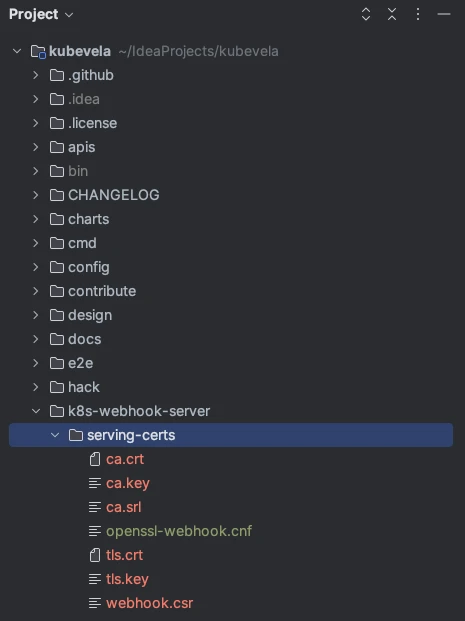
Ensure the k8s-webhook-server/serving-certs directory contains:
ca.crttls.crttls.key
Step 2: Enable Webhook in Source Code
2.1 Locate the Webhook Configuration File
File path: cmd/core/app/config/webhook.go
2.2 Modify Webhook Settings
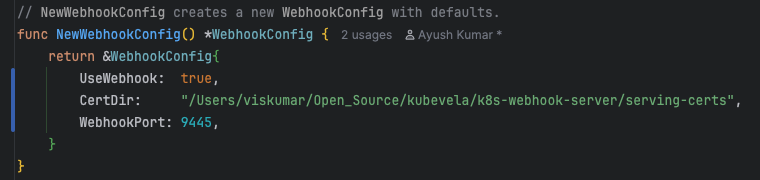
In the function func NewWebhookConfig() *WebhookConfig, update the following:
// Set UseWebhook to true
UseWebhook: true,

// Update CertDir to your certificates directory
CertDir: "/absolute/path/to/kubevela/k8s-webhook-server/serving-certs",

// Change WebhookPort if needed (default is 9443)
// If using Rancher, use a different port as 9443 is occupied
WebhookPort: 9445,
If you're using Rancher Desktop or other tools that occupy port 9443, change WebhookPort to an available port (e.g., 9445).
Step 3: Start the Controller in Debug Mode
Configure your IDE to run the controller in debug mode. See Debugging KubeVela Controllers for detailed IDE setup instructions.
Verify Webhook Server is Running
Once the controller is running, verify the webhook server by making a POST request:
curl -k -X POST https://{HOST_IP}:{PORT}/mutating-core-oam-dev-v1beta1-componentdefinitions?timeout=10s
Expected response:
{
  "response": {
    "uid": "",
    "allowed": false,
    "status": {
      "metadata": {},
      "message": "request body is empty",
      "code": 400
    }
  }
}
Step 4: Configure Kubernetes Webhook
4.1 Prepare Your Cluster
Ensure you have:
- A running Kubernetes cluster (as created in the controller debugging guide)
- KubeVela CRDs and definitions installed (
make core-install && make def-install)
4.2 Encode CA Certificate
cd k8s-webhook-server/serving-certs
base64 -i ca.crt > ca.crt.b64
Copy the Base64-encoded string from ca.crt.b64 for use in the webhook configurations.
4.3 Create Mutating Webhook Configuration
Create MutatingWebhookConfiguration.yaml:
apiVersion: admissionregistration.k8s.io/v1
kind: MutatingWebhookConfiguration
metadata:
  annotations:
    meta.helm.sh/release-name: kubevela
    meta.helm.sh/release-namespace: vela-system
  labels:
    app.kubernetes.io/managed-by: Helm
  name: kubevela-vela-core-admission
webhooks:
  - admissionReviewVersions:
      - v1beta1
      - v1
    clientConfig:
      caBundle: <Base64 string from ca.crt.b64>
      url: "https://<your-local-webhook-url>:<port>/mutating-core-oam-dev-v1beta1-applications"
    failurePolicy: Fail
    matchPolicy: Equivalent
    name: mutating.core.oam.dev.v1beta1.applications
    namespaceSelector: {}
    objectSelector: {}
    reinvocationPolicy: Never
    rules:
      - apiGroups:
          - core.oam.dev
        apiVersions:
          - v1beta1
        operations:
          - CREATE
          - UPDATE
        resources:
          - applications
        scope: '*'
    sideEffects: None
    timeoutSeconds: 10
  - admissionReviewVersions:
      - v1beta1
      - v1
    clientConfig:
      caBundle: <Base64 string from ca.crt.b64>
      url: "https://<your-local-webhook-url>:<port>/mutating-core-oam-dev-v1beta1-componentdefinitions"
    failurePolicy: Fail
    matchPolicy: Equivalent
    name: mutating.core.oam-dev.v1beta1.componentdefinitions
    namespaceSelector: {}
    objectSelector: {}
    reinvocationPolicy: Never
    rules:
      - apiGroups:
          - core.oam.dev
        apiVersions:
          - v1beta1
        operations:
          - CREATE
          - UPDATE
        resources:
          - componentdefinitions
        scope: '*'
    sideEffects: None
    timeoutSeconds: 10
4.4 Create Validating Webhook Configuration
Create ValidatingWebhookConfiguration.yaml:
apiVersion: admissionregistration.k8s.io/v1
kind: ValidatingWebhookConfiguration
metadata:
  annotations:
    meta.helm.sh/release-name: kubevela
    meta.helm.sh/release-namespace: vela-system
  labels:
    app.kubernetes.io/managed-by: Helm
  name: kubevela-vela-core-admission
webhooks:
  - admissionReviewVersions:
      - v1beta1
      - v1
    clientConfig:
      caBundle: <Base64 string from ca.crt.b64>
      url: "https://<your-local-webhook-url>:<port>/validating-core-oam-dev-v1beta1-traitdefinitions"
    failurePolicy: Fail
    matchPolicy: Equivalent
    name: validating.core.oam.dev.v1beta1.traitdefinitions
    namespaceSelector: {}
    objectSelector: {}
    rules:
      - apiGroups:
          - core.oam.dev
        apiVersions:
          - v1beta1
        operations:
          - CREATE
          - UPDATE
        resources:
          - traitdefinitions
        scope: '*'
    sideEffects: None
    timeoutSeconds: 5
  - admissionReviewVersions:
      - v1beta1
      - v1
    clientConfig:
      caBundle: <Base64 string from ca.crt.b64>
      url: "https://<your-local-webhook-url>:<port>/validating-core-oam-dev-v1beta1-applications"
    failurePolicy: Fail
    matchPolicy: Equivalent
    name: validating.core.oam.dev.v1beta1.applications
    namespaceSelector: {}
    objectSelector: {}
    rules:
      - apiGroups:
          - core.oam.dev
        apiVersions:
          - v1beta1
        operations:
          - CREATE
          - UPDATE
        resources:
          - applications
        scope: '*'
    sideEffects: None
    timeoutSeconds: 10
  - admissionReviewVersions:
      - v1beta1
      - v1
    clientConfig:
      caBundle: <Base64 string from ca.crt.b64>
      url: "https://<your-local-webhook-url>:<port>/validating-core-oam-dev-v1beta1-componentdefinitions"
    failurePolicy: Fail
    matchPolicy: Equivalent
    name: validating.core.oam-dev.v1beta1.componentdefinitions
    namespaceSelector: {}
    objectSelector: {}
    rules:
      - apiGroups:
          - core.oam.dev
        apiVersions:
          - v1beta1
        operations:
          - CREATE
          - UPDATE
        resources:
          - componentdefinitions
        scope: '*'
    sideEffects: None
    timeoutSeconds: 10
  - admissionReviewVersions:
      - v1beta1
      - v1
    clientConfig:
      caBundle: <Base64 string from ca.crt.b64>
      url: "https://<your-local-webhook-url>:<port>/validating-core-oam-dev-v1beta1-policydefinitions"
    failurePolicy: Fail
    matchPolicy: Equivalent
    name: validating.core.oam-dev.v1beta1.policydefinitions
    namespaceSelector: {}
    objectSelector: {}
    rules:
      - apiGroups:
          - core.oam.dev
        apiVersions:
          - v1beta1
        operations:
          - CREATE
          - UPDATE
        resources:
          - policydefinitions
        scope: '*'
    sideEffects: None
    timeoutSeconds: 10
4.5 Update Configuration Values
In both YAML files:
- Replace
<BASE64_ENCODED_CA_CERT>with the Base64 string fromca.crt.b64 - Replace
<HOST_IP>with your machine's IP address - Replace
<PORT>with the webhook port (e.g., 9445)
4.6 Apply Webhook Configurations
kubectl apply -f ValidatingWebhookConfiguration.yaml
kubectl apply -f MutatingWebhookConfiguration.yaml
Step 5: Test with Breakpoints
5.1 Create a Test Manifest
Create component.yaml:
apiVersion: core.oam.dev/v1beta1
kind: ComponentDefinition
metadata:
  name: configmap-component
spec:
  workload:
    definition:
      apiVersion: v1
      kind: ConfigMap
  schematic:
    cue:
      template: |
        parameter: {
          firstkey: string
          secondkey: string
        }
        output: {
          apiVersion: "v1"
          kind:       "ConfigMap"
          metadata: {
            name: context.name
          }
          data: {
            firstkey: parameter.firstkey
            secondkey: parameter.secondkey
            data: "10"
          }
        }
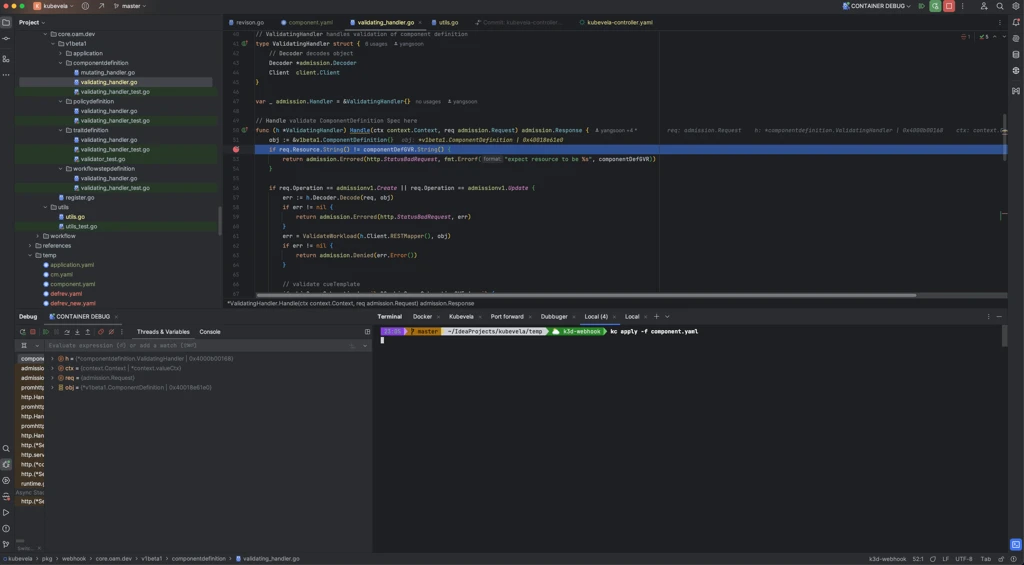
5.2 Set Breakpoint in Webhook Handler
Open the webhook handler file in your IDE:
pkg/webhook/core.oam.dev/v1beta1/componentdefinition/validating_handler.go
Set a breakpoint at the desired line (e.g., line 52 in the Handle function).
5.3 Apply the Manifest
kubectl apply -f component.yaml
5.4 Debug
When you apply the manifest, the webhook is triggered and execution will pause at your breakpoint, allowing you to:
- Inspect variables
- Step through the code
- Examine the admission request
- Test validation logic
Automated Setup Script
To automate the entire setup process, use the following script.
Prerequisites for the Script
- You must be in the root directory of the
kubevelarepository kubectl,openssl, andbashmust be installed- A running Kubernetes cluster configured via
~/.kube/config - KubeVela must NOT already be installed on the cluster
Usage
# Navigate to KubeVela root directory
cd path/to/kubevela

# Execute the script ( It will take you system ip dynamically and configured port )
./setup-kubevela-debugger.sh

# Execute the script with your system IP and port
./setup-kubevela-debugger.sh <IP_ADDRESS> <PORT>

# Example
./setup-kubevela-debugger.sh 192.168.1.100 9445
The script will:
- Generate all necessary certificates
- Update controller webhook configuration
- Wait for you to start the debugger manually
- Create and apply Kubernetes webhook configurations
Script: setup-kubevela-debugger.sh
#!/usr/bin/env bash

set -euo pipefail

#===============================================================================
# Script: setup-kubevela-debugger.sh
# Purpose: Install and configure the KubeVela controller in debug mode
#          with webhooks, using the provided IP and port, generate certs,
#          update code options, and deploy the webhook secret and configurations.
# Usage:   ./setup-kubevela-debugger.sh <IP_ADDRESS> <PORT>
# Example: ./setup-kubevela-debugger.sh 192.168.1.100 9090
#
# NOTE: This script must be run from the root of the kubevela repository!
#===============================================================================

#--- STEP 1: Helper: show usage and exit ---------------------------------------
usage() {
  cat <<EOF
Usage: $0 <IP_ADDRESS> <PORT>

Installs/configures the KubeVela controller in debug mode with webhooks.
  <IP_ADDRESS>   IP the controller will bind to (e.g. 10.0.01)
  <PORT>         Port the controller will listen on (e.g. 9443)

Example:
  $0 192.168.1.100 9090
EOF
  exit 1
}

#--- STEP 2: Parse and validate args -------------------------------------------
IP_ADDR="${1:-}"
PORT="${2:-}"

# If IP not provided, get current machine IP
if [[ -z "$IP_ADDR" ]]; then
  # Try macOS method first
  if command -v ipconfig &> /dev/null; then
    IP_ADDR=$(ipconfig getifaddr en0 2>/dev/null || ipconfig getifaddr en1 2>/dev/null)
  fi

  # If still empty, try Linux methods
  if [[ -z "$IP_ADDR" ]]; then
    # Method 1: hostname -I (Linux)
    if command -v hostname &> /dev/null && hostname -I &> /dev/null; then
      IP_ADDR=$(hostname -I 2>/dev/null | awk '{print $1}')
    fi
  fi

  # If still empty, try cross-platform ifconfig/ip method
  if [[ -z "$IP_ADDR" ]]; then
    # Method 2: ip command (modern Linux)
    if command -v ip &> /dev/null; then
      IP_ADDR=$(ip route get 1.1.1.1 2>/dev/null | awk '{print $7; exit}')
    fi
  fi

  # Final fallback: parse ifconfig output (works on both Linux and macOS)
  if [[ -z "$IP_ADDR" ]] && command -v ifconfig &> /dev/null; then
    IP_ADDR=$(ifconfig | grep "inet " | grep -v 127.0.0.1 | awk '{print $2}' | head -n 1 | sed 's/addr://')
  fi

  # If we still couldn't detect IP, error out
  if [[ -z "$IP_ADDR" ]]; then
    echo "ERROR: Could not determine current IP address."
    echo "Please provide IP address manually: $0 <IP_ADDRESS> <PORT>"
    usage
  fi
fi

# If PORT not provided, use default
if [[ -z "$PORT" ]]; then
  PORT=9445
fi

# Validate IP
if ! [[ $IP_ADDR =~ ^[0-9]+\.[0-9]+\.[0-9]+\.[0-9]+$ ]]; then
  echo "ERROR: '$IP_ADDR' is not a valid IPv4 address."
  usage
fi

# Validate Port
if ! [[ $PORT =~ ^[0-9]+$ ]] || (( PORT < 1 || PORT > 65535 )); then
  echo "ERROR: '$PORT' is not a valid port number."
  usage
fi

echo "➔ Using IP:   ${IP_ADDR}"
echo "➔ Using Port: ${PORT}"
echo

#--- STEP 3: Ensure script is run from kubevela repo root ----------------------
# Check for key files that should exist in the kubevela repo root
if [[ ! -f "go.mod" ]] || [[ ! -f "Makefile" ]] || [[ ! -d "cmd/core" ]]; then
  echo "ERROR: Script must run from the root of the kubevela repository."
  echo "       Expected files/directories not found: go.mod, Makefile, cmd/core"
  exit 1
fi

echo "==> Running in kubevela repo root"

#--- STEP 4: Prepare directory -------------------------------------------------
echo "==> STEP 4: Create serving certificates directory"
mkdir -p k8s-webhook-server/serving-certs

echo "==> Directory ready: k8s-webhook-server/serving-certs"

#--- STEP 5: Generate CA -------------------------------------------------------
echo "==> STEP 5: Generate CA private key and self-signed cert"
pushd k8s-webhook-server/serving-certs > /dev/null
openssl genrsa -out ca.key 2048
openssl req -x509 -new -nodes -key ca.key -days 3650 -out ca.crt -subj "/CN=Webhook CA"
popd > /dev/null

echo "==> CA key and cert generated"

#--- STEP 6: OpenSSL config ----------------------------------------------------
echo "==> STEP 6: Create openssl-webhook.cnf"
pushd k8s-webhook-server/serving-certs > /dev/null
cat <<EOF > openssl-webhook.cnf
[ req ]
default_bits       = 2048
prompt             = no
default_md         = sha256
distinguished_name = dn
req_extensions     = req_ext

[ dn ]
CN = ${IP_ADDR}

[ req_ext ]
subjectAltName = @alt_names

[ alt_names ]
IP.1 = ${IP_ADDR}
EOF
popd > /dev/null

echo "==> OpenSSL config created"

#--- STEP 7: Webhook certs -----------------------------------------------------
echo "==> STEP 7: Generate TLS key, CSR and signed cert"
pushd k8s-webhook-server/serving-certs > /dev/null
openssl genrsa -out tls.key 2048
openssl req -new -key tls.key -out webhook.csr -config openssl-webhook.cnf
openssl x509 -req -in webhook.csr -CA ca.crt -CAkey ca.key -CAcreateserial \
  -out tls.crt -days 365 -extensions req_ext -extfile openssl-webhook.cnf
popd > /dev/null

echo "==> TLS key, CSR, and cert generated"

#--- STEP 8: Update CoreOptions ------------------------------------------------
echo "==> STEP 8: Enable webhook in CoreOptions"
OPTIONS_FILE="cmd/core/app/config/webhook.go"
[[ -f "$OPTIONS_FILE" ]] || { echo "ERROR: $OPTIONS_FILE not found"; exit 1; }
cp "$OPTIONS_FILE" "${OPTIONS_FILE}.bak"
# macOS sed - in-place
sed -E -i '' 's/(UseWebhook:[[:space:]]*)false/\1true/' "$OPTIONS_FILE"
sed -E -i '' "s|(CertDir:[[:space:]]*)\"[^\"]*\"|\1\"$(pwd)/k8s-webhook-server/serving-certs\"|" "$OPTIONS_FILE"
sed -E -i '' "s/(WebhookPort:[[:space:]]*)[0-9]+/\1${PORT}/" "$OPTIONS_FILE"
echo "==> CoreOptions updated"

#--- STEP 9: Wait for debugger -------------------------------------------------
echo "==> STEP 9: Start controller in debug mode"
read -rp "Press [ENTER] once the controller is running in debug mode... "

echo "==> Continuing after debug start"

#--- STEP 10: Export KUBECONFIG ------------------------------------------------
echo "==> STEP 10: Export KUBECONFIG"
export KUBECONFIG="${HOME}/.kube/config"
echo "Using KUBECONFIG=${KUBECONFIG}"

#--- STEP 11: Encode certs -----------------------------------------------------
echo "==> STEP 11: Encode certificates to Base64"
pushd k8s-webhook-server/serving-certs > /dev/null
CA_CRT_B64=$(base64 -i ca.crt | tr -d '\n')
popd > /dev/null

echo "==> Certificates encoded"

#--- STEP 12: Create webhook configuration manifests ---------------------------
echo "==> STEP 12: Create webhook configuration manifest files"
pushd k8s-webhook-server/serving-certs >/dev/null
cat <<EOF >MutatingWebhookConfiguration.yaml
apiVersion: admissionregistration.k8s.io/v1
kind: MutatingWebhookConfiguration
metadata:
  annotations:
    meta.helm.sh/release-name: kubevela
    meta.helm.sh/release-namespace: vela-system
  labels:
    app.kubernetes.io/managed-by: Helm
  name: kubevela-vela-core-admission
webhooks:
- admissionReviewVersions:
  - v1beta1
  - v1
  clientConfig:
    caBundle: ${CA_CRT_B64}
    url: "https://${IP_ADDR}:${PORT}/mutating-core-oam-dev-v1beta1-applications"
  failurePolicy: Fail
  matchPolicy: Equivalent
  name: mutating.core.oam.dev.v1beta1.applications
  namespaceSelector: {}
  objectSelector: {}
  reinvocationPolicy: Never
  rules:
  - apiGroups:
      - core.oam.dev
    apiVersions:
      - v1beta1
    operations:
      - CREATE
      - UPDATE
    resources:
      - applications
    scope: '*'
  sideEffects: None
  timeoutSeconds: 10
- admissionReviewVersions:
  - v1beta1
  - v1
  clientConfig:
    caBundle: ${CA_CRT_B64}
    url: "https://${IP_ADDR}:${PORT}/mutating-core-oam-dev-v1beta1-componentdefinitions"
  failurePolicy: Fail
  matchPolicy: Equivalent
  name: mutating.core.oam.dev.v1beta1.componentdefinitions
  namespaceSelector: {}
  objectSelector: {}
  reinvocationPolicy: Never
  rules:
  - apiGroups:
      - core.oam.dev
    apiVersions:
      - v1beta1
    operations:
      - CREATE
      - UPDATE
    resources:
      - componentdefinitions
    scope: '*'
  sideEffects: None
  timeoutSeconds: 10
EOF
cat <<EOF >ValidatingWebhookConfiguration.yaml
apiVersion: admissionregistration.k8s.io/v1
kind: ValidatingWebhookConfiguration
metadata:
  annotations:
    meta.helm.sh/release-name: kubevela
    meta.helm.sh/release-namespace: vela-system
  name: kubevela-vela-core-admission
webhooks:
- admissionReviewVersions:
  - v1beta1
  - v1
  clientConfig:
    caBundle: ${CA_CRT_B64}
    url: "https://${IP_ADDR}:${PORT}/validating-core-oam-dev-v1beta1-traitdefinitions"
  failurePolicy: Fail
  matchPolicy: Equivalent
  name: validating.core.oam.dev.v1beta1.traitdefinitions
  namespaceSelector: {}
  objectSelector: {}
  rules:
  - apiGroups:
      - core.oam.dev
    apiVersions:
      - v1beta1
    operations:
      - CREATE
      - UPDATE
    resources:
      - traitdefinitions
    scope: '*'
  sideEffects: None
  timeoutSeconds: 5
- admissionReviewVersions:
  - v1beta1
  - v1
  clientConfig:
    caBundle: ${CA_CRT_B64}
    url: "https://${IP_ADDR}:${PORT}/validating-core-oam-dev-v1beta1-applications"
  failurePolicy: Fail
  matchPolicy: Equivalent
  name: validating.core.oam.dev.v1beta1.applications
  namespaceSelector: {}
  objectSelector: {}
  rules:
  - apiGroups:
      - core.oam.dev
    apiVersions:
      - v1beta1
    operations:
      - CREATE
      - UPDATE
    resources:
      - applications
    scope: '*'
  sideEffects: None
  timeoutSeconds: 10
- admissionReviewVersions:
  - v1beta1
  - v1
  clientConfig:
    caBundle: ${CA_CRT_B64}
    url: "https://${IP_ADDR}:${PORT}/validating-core-oam-dev-v1beta1-componentdefinitions"
  failurePolicy: Fail
  matchPolicy: Equivalent
  name: validating.core.oam.dev.v1beta1.componentdefinitions
  namespaceSelector: {}
  objectSelector: {}
  rules:
  - apiGroups:
      - core.oam.dev
    apiVersions:
      - v1beta1
    operations:
      - CREATE
      - UPDATE
    resources:
      - componentdefinitions
    scope: '*'
  sideEffects: None
  timeoutSeconds: 10
- admissionReviewVersions:
  - v1beta1
  - v1
  clientConfig:
    caBundle: ${CA_CRT_B64}
    url: "https://${IP_ADDR}:${PORT}/validating-core-oam-dev-v1beta1-policydefinitions"
  failurePolicy: Fail
  matchPolicy: Equivalent
  name: validating.core.oam.dev.v1beta1.policydefinitions
  namespaceSelector: {}
  objectSelector: {}
  rules:
  - apiGroups:
      - core.oam.dev
    apiVersions:
      - v1beta1
    operations:
      - CREATE
      - UPDATE
    resources:
      - policydefinitions
    scope: '*'
  sideEffects: None
  timeoutSeconds: 10
EOF
popd >/dev/null

#--- STEP 13: Apply webhook configurations -------------------------------------
echo "==> STEP 13: Apply webhook configuration manifests"
kubectl apply -f k8s-webhook-server/serving-certs/ValidatingWebhookConfiguration.yaml
kubectl apply -f k8s-webhook-server/serving-certs/MutatingWebhookConfiguration.yaml

echo "🎉 Setup complete!"
exit 0
Troubleshooting
| Symptom | Likely Cause | Resolution |
|---|---|---|
| Webhook server fails to start | Missing or invalid certificates | Verify all three certificate files exist in the correct directory |
| Certificate validation errors | Incorrect IP in certificate | Regenerate certificates with the correct HOST_IP |
| Connection refused from cluster | Firewall blocking webhook port | Check firewall settings and ensure the port is open |
| Webhook timeout | Network issues or controller not running | Verify controller is running and accessible from cluster |
kubectl apply hangs | Webhook not responding | Check webhook server logs; verify URL and port are correct |
Best Practices
- Use a dedicated port: Avoid conflicts by using a non-standard port (e.g., 9445 instead of 9443)
- Keep certificates organized: Store all certificates in the designated directory
- Test incrementally: Verify each step before proceeding to the next
- Clean up when done: Remove webhook configurations from the cluster when finished debugging
- Document your IP: Keep note of which IP address you used for quick reference
Further Reading
- Debugging KubeVela Controllers
- Kubernetes Admission Controllers
- Kubernetes Webhooks
- KubeVela Developer Guide